
There is a specific kind of frustration that comes from optimizing the wrong thing. You spend time on subject lines. You test send times. You rewrite the preview text. Open rates stay flat anyway.
That was the gap I kept running into before treating deliverability as something worth watching continuously, not just checking when a campaign underperformed. Most sending setups have zero visibility into what happens between send and open.
Emails leave. Some land well. Others do not. You find out weeks later, if at all.
Email deliverability monitoring fills that gap. It gives you a live view of how your domain is being perceived by inbox providers right now, so when something starts drifting, you catch it before it costs you.
What Is Email Deliverability Monitoring?
Email deliverability monitoring is the continuous tracking of domain reputation, inbox placement, blacklist status, and sending health signals in real time.
It tells you whether your emails are still trusted by inbox providers right now. Not yesterday. Not after the next campaign.
Unlike running a one-time email health checker before a send, it tracks movement. Changes in sender reputation, shifts in how spam filters respond to your domain, and early signals that something is drifting before it becomes visible. At a practical level, it pulls together five core data streams that each tell a different part of the story.
What Are the 5 Core Signals to Monitor?
[IMAGE ASSET: numbered list graphic — “5 Signals Every Sender Needs to Monitor” — short parallel entries, suitable for social card or blog inline graphic]
1. Domain Reputation Score
How inbox providers currently rate your sending domain. Updates with every campaign.
2. Blacklist Status
Whether your domain or IP appears on any of the 100+ spam databases that providers actively check.
3. Inbox Placement Rate
Where your emails actually land: primary inbox, promotions tab, or spam folder.
4. Spam Complaint Rate
The percentage of recipients marking your email as spam. Affects sender reputation directly and fast.
5. Authentication Pass Rate
Whether SPF, DKIM, and DMARC are passing consistently on every send.
Each of these signals moves independently. A clean spam score does not mean your blacklist status is clean. And passing authentication does not mean your reputation is high. Monitoring all five together is what gives you a complete picture of your email health.
How Does Domain Reputation Change Over Time?
Your domain reputation is not a fixed score. It updates with every send, based on how recipients interact with your emails and how inbox providers interpret those interactions.
According to Validity’s 2025 Email Deliverability Benchmark Report, senders with a strong domain reputation consistently see inbox placement rates above 90%. Senders with a poor reputation average closer to 60%. That 30-point gap is not a content problem. It is a reputation problem.
Here is what typically pulls reputation down between sends:
- Volume spikes: sending significantly more than your domain’s established baseline
- High bounce rates: mailing stale or unverified lists
- Complaint surges: recipients flagging messages across multiple consecutive campaigns
- Low engagement over time: opens and replies dropping, signaling low relevance to providers
These signals do not fix themselves after one clean send. They carry forward. A domain that has taken three hits in a row needs deliberate recovery, not just a better subject line on the next campaign.
But here is what makes this manageable. The window between when reputation starts slipping and when inbox providers fully react is where you have room to adjust. Catch it then. Not three weeks later, when open rates have already cratered.
Can You Track Domain Reputation Without Paid Tools?
Yes, but with real limits. Here is what free tools cover and where they stop.
Google Postmaster Tools
Google Postmaster Tools tracks Gmail-specific domain reputation, spam rate, and authentication results. Free to set up, and it is the closest thing you have to seeing what Gmail actually thinks of your domain. The reputation scale runs four levels: High, Medium, Low, and Bad. Useful for Gmail traffic, but requires a minimum sending volume before data appears, and updates run 24 to 48 hours behind. Google’s own email sender guidelines document what thresholds trigger filtering changes, including the 0.10% spam complaint rate threshold that affects inbox placement.
Microsoft SNDS
Microsoft SNDS covers Outlook and Hotmail IP reputation and complaint rates. IP-level visibility only, no domain-level view. Data is delayed by 24 to 48 hours. Worth setting up if a meaningful portion of your list is on Outlook or Hotmail addresses, but it does not replace a full domain reputation check.
MXToolbox and Similar Blacklist Checkers
MXToolbox is the most widely used free tool for manual blacklist detection across major databases. Free, real-time lookups across 100+ blacklists. But manual means you have to remember to check, and it does not send spam alerts when something changes. You are pulling data. It is not pushing it to you.
| Tool | What It Covers | Data Delay | Alert Capability |
| Google Postmaster Tools | Gmail reputation, spam rate | 24 to 48 hours | None |
| Microsoft SNDS | Outlook IP reputation | 24 to 48 hours | None |
| MXToolbox | Blacklist checks, DNS | Real-time | None |
| Mail-Tester | Spam score per send | Real-time | None |
The honest problem with free tools is fragmentation. None of them gives you a unified view. You end up toggling between three dashboards to build a picture that should be in one place. And none of them send spam alerts when signals shift. You find out by logging in, if you remembered to log in at all.
For low-volume senders running occasional campaigns, this setup is workable. For anyone sending consistently or managing multiple domains, the gaps are where problems slip through unnoticed.
How Does Real-Time Monitoring Work in E-Warmup?
E-Warmup is an email deliverability tool built around a single principle: you should not have to check. It should tell you.
The dashboard covers all five monitoring signals in one interface. Sender reputation score, inbox placement by provider, blacklist monitoring across 50+ databases, authentication status for SPF, DKIM, and DMARC, and spam complaint trends. No switching between tools. No manual lookups. And with 10,000+ real inboxes in its network, E-Warmup tests placement across the providers your recipients actually use, not a simulated sample.
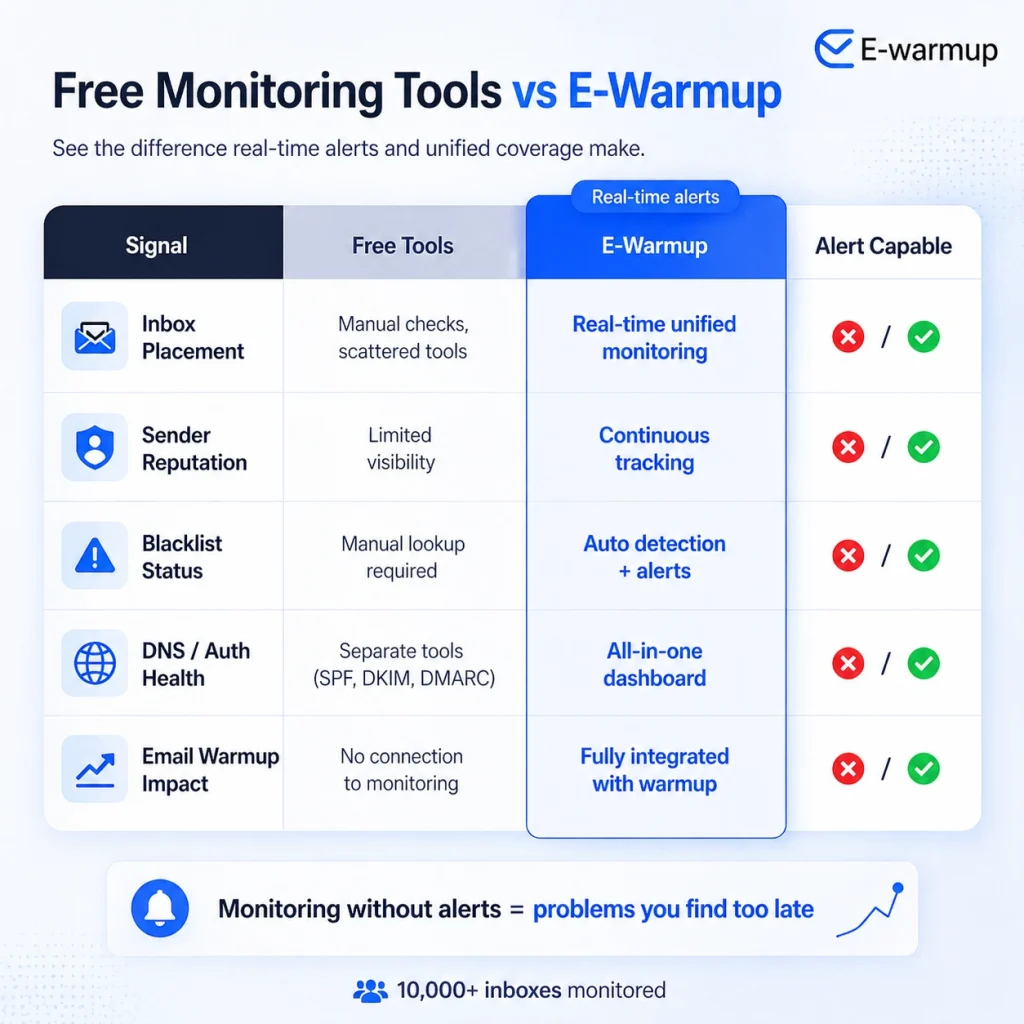
What changes the workflow is the alert layer. When your domain reputation drops, you get notified. When a blacklist flag appears, you see it immediately. Spam alerts fire before a pattern becomes a deliverability incident. That shift from reactive checking to being told when something needs attention is the functional difference between manual and real-time email monitoring.
For teams running outreach across multiple markets, E-Warmup also supports monitoring across 30+ languages. Inbox provider behavior and spam filter logic differ by geography, and that coverage matters when your sending is not limited to one region.
Setup takes under 30 seconds. No credit card required.
What Monitoring Cadence Actually Works?
Most teams either check too rarely or check everything at once without structure. Neither works well.
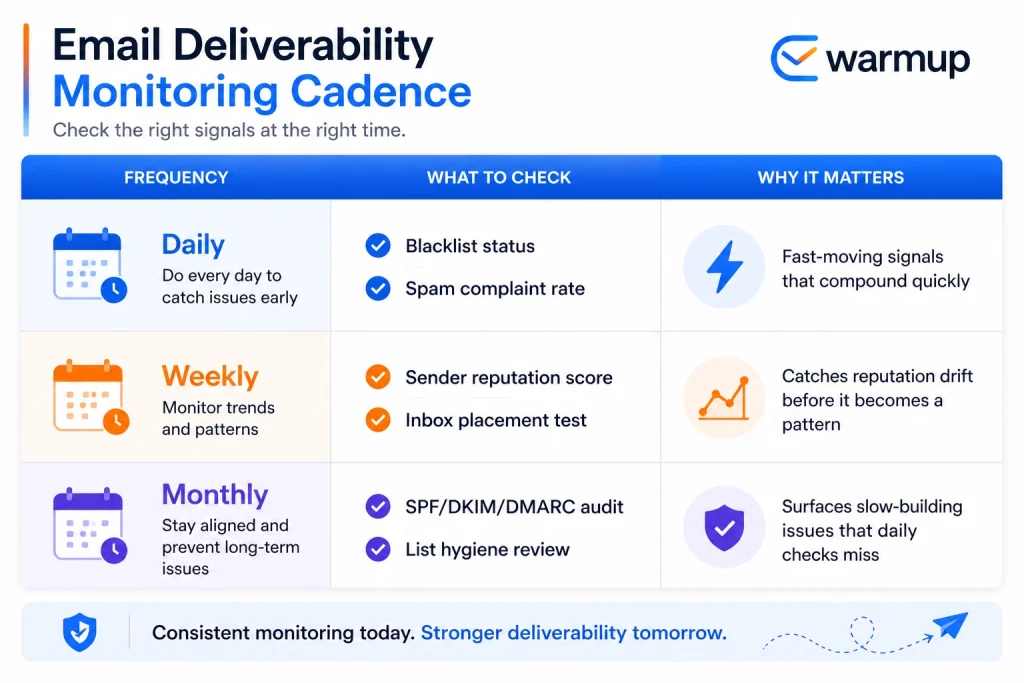
Daily Checks
Blacklist status and spam complaint rate. These signals move fast and compound quickly. A blacklist flag that sits unnoticed for 72 hours affects far more sends than one caught the same day. Google’s Postmaster Tools spam rate dashboard updates daily and is the fastest free signal available for Gmail complaint trends.
Weekly Checks
Sender reputation trends and inbox placement tests. Run a domain reputation check to see if the trend line is moving up, flat, or down. Run a placement test to confirm how recent sends are actually landing across providers. Our inbox placement test guide covers exactly how to run one, what healthy results look like, and what to do when they are not.
Monthly Checks
Authentication audit and list hygiene. Verify SPF, DKIM, and DMARC are still passing cleanly. Litmus’s breakdown of SPF, DKIM, and DMARC is one of the clearest technical references for understanding what each record does and how failures affect deliverability. Review bounce rates and unsubscribe patterns. Clean the list before issues become a reputation problem rather than after. If you want to understand how inbox placement and delivery rate differ and which one is actually driving your open rate, Inbox Placement vs Delivery Rate: What Actually Impacts Open Rate? breaks that down directly.
| Frequency | What to Check | Why It Matters |
| Daily | Blacklist status, spam complaint rate | Fast-moving signals that compound quickly |
| Weekly | Sender reputation score, inbox placement test | Catches reputation drift before it becomes a pattern |
| Monthly | SPF/DKIM/DMARC audit, list hygiene review | Surfaces slow-building issues that daily checks miss |
This structure keeps monitoring manageable. It also gives you a consistent baseline. When something shifts, you can tell exactly when it started because you have data from the week before to compare against.
Pre-Send Deliverability Checklist
Before any campaign goes out, run through this:
- Domain reputation is stable with no recent drops
- No active blacklist flags on domain or sending IP
- SPF, DKIM, and DMARC all passing cleanly
- Recent inbox placement test shows healthy distribution across providers
- Spam complaint rate is below 0.10%
- Sending volume is consistent with your established baseline
- List cleaned within the past 30 days
A five-minute check here is significantly easier than diagnosing a deliverability problem after open rates have already dropped.
Frequently Asked Questions
Set Up Real-Time Deliverability Monitoring with E-Warmup
If you are still finding out about deliverability problems from open rate drops, the email deliverability monitoring layer is missing.
E-Warmup covers all five signals automatically. Sender reputation, inbox placement, blacklist detection across 50+ providers, authentication status, and spam complaint trends, all from a single dashboard. Spam alerts come to you when something shifts. You are not logging in to check.
Related Reading
Inbox Placement Test: The Ignored Metric That Decides Your Open Rate in 2026 How to run an inbox placement test, what healthy results look like, and what to do when your emails are not landing where they should.
