

You sent 10,000 emails. Your ESP reported 98% delivered. Your open rate came back at 6%.
Something is very wrong. But your dashboard says everything is fine.
Here is what actually happened: your emails landed in spam. Or the promotions tab. Or somewhere your subscribers never look. The delivery rate told you nothing about where those emails actually went. It never does.
The metric that actually matters is your inbox placement rate. And the only way to know it before you hit send is to run an inbox placement test.
This guide walks you through what inbox placement testing is, how it works, what the benchmarks mean, and how to build a system that stops you from sending blind.
What Is an Inbox Placement Test?
An inbox placement test is a pre-send diagnostic that shows where your emails land across real inboxes, including primary, promotions, or spam folders.
It exists because email service providers only tell you whether your message was accepted by a receiving server. They do not tell you what happened after that. Did it reach the inbox? Did it get filtered to spam? Did it disappear entirely? Without a placement test, you have no idea.
Here is what a placement test actually reveals:
- What percentage of your emails reached the primary inbox
- What percentage were diverted to promotions or social tabs
- What percentage were flagged as spam
- Which inbox providers (Gmail, Outlook, Yahoo) are treating your mail differently
- Whether your sender reputation is healthy or degrading
Most marketers skip this entirely. They look at delivery rates, assume everything is fine, and wonder why engagement keeps dropping. According to Stripo’s email deliverability research, only 13% of email professionals use inbox placement tests to check whether their campaigns actually land in the inbox or bounce. That means the vast majority of senders are operating completely blind. The inbox placement test is the diagnostic they are missing.
Inbox Placement vs Delivery Rate: Why Most Marketers Get This Wrong
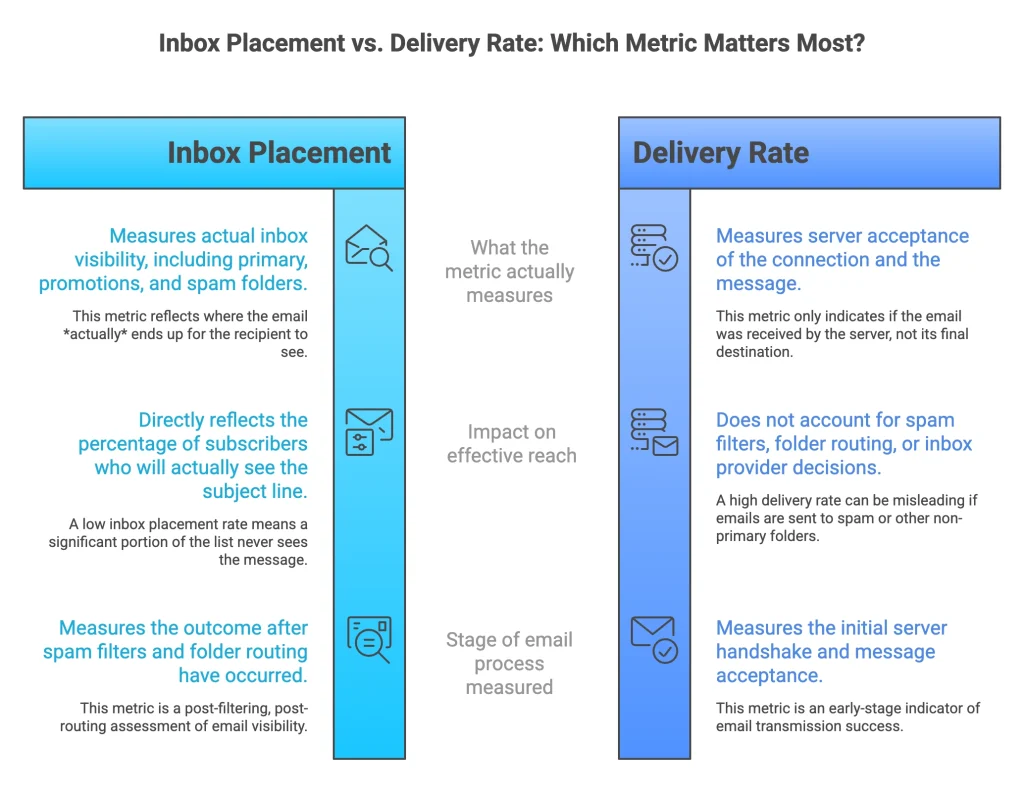
Delivery rate measures server acceptance, while inbox placement rate measures actual inbox visibility.
This distinction sounds small. It is not.
When your email is “delivered,” all that means is a receiving server accepted the connection and the message. Spam filters run after that. Folder routing happens after that. The inbox provider makes its decision after that. All of that activity is invisible to your delivery rate.
Here is a concrete example. You send a campaign to 50,000 subscribers. Your delivery rate is 97%. That looks excellent. But here is what actually happened:
- 45% reached the primary inbox
- 28% landed in promotions
- 24% went to spam
Your effective reach was roughly 45% of your list, not 97%. The opens you got came from less than half the people you thought you were reaching. The rest never saw your subject line.
This is where most campaigns fail. Not at the send stage. Not even at the delivery stage. At the placement stage, which most senders never measure.
Spam counts as delivered. Promotions count as delivered. A message sitting in a folder nobody opens counts as delivered. Delivery rate is a server handshake metric. Inbox placement is a visibility metric. They are not interchangeable.
What Is a Good Inbox Placement Rate? (With Benchmarks)
A good inbox placement rate is above 90%, while anything below 70% signals a serious deliverability issue. Your inbox placement rate is the single most predictive metric for open rate performance — more than subject line, send time, or list size.
To put this in perspective: Validity’s 2025 Email Deliverability Benchmark Report found that roughly one in six emails never reaches the inbox, keeping the global average inbox placement around 84%. That number sounds acceptable on the surface. But that average includes both high-performing opt-in senders and low-performing cold outreach programs. The spread is enormous, and where your program falls in that range determines your revenue.
Here is how to read your own placement score:
90% and above: Healthy Your authentication is solid, your sender reputation is strong, and inbox providers trust your mail. Keep monitoring. Do not get complacent. Even well-established senders can slip if list hygiene is neglected or sending patterns change suddenly.
70% to 89%: Risk Zone Something is affecting your placement. Common culprits include a partially warmed domain, inconsistent engagement rates, or authentication gaps. Investigate immediately and do not scale volume until you fix the underlying issue. Letting this sit means it will deteriorate further.
50% to 69%: Reputation Damage At this level, a significant portion of your audience is not seeing your emails at all. Your domain or IP likely has reputation problems. Stop new campaigns, audit your list quality, check for blacklist listings, and rebuild through structured warmup.
Below 50%: Critical Failure More than half of your mail is being routed away from inboxes. This level of placement collapse typically requires a full deliverability recovery process: new domain warmup, deep list hygiene, re-engagement campaigns, and close monitoring over several weeks before attempting any volume sends.
GlockApps’ updated deliverability data shows that high-volume senders pushing 1 million or more emails per month saw inbox placement fall to as low as 27.63% in early 2025, a 22-point year-over-year collapse. This is not a fringe case. It affects any sender who scales volume without maintaining the engagement and authentication quality that providers demand.
Knowing your benchmark is not enough. The key is understanding which actions push you into each tier and what you need to do to move up.
How Does an Inbox Placement Test Work? (Step-by-Step System)
Inbox placement testing works by sending emails to a controlled seed list of real inboxes and tracking where those emails land.
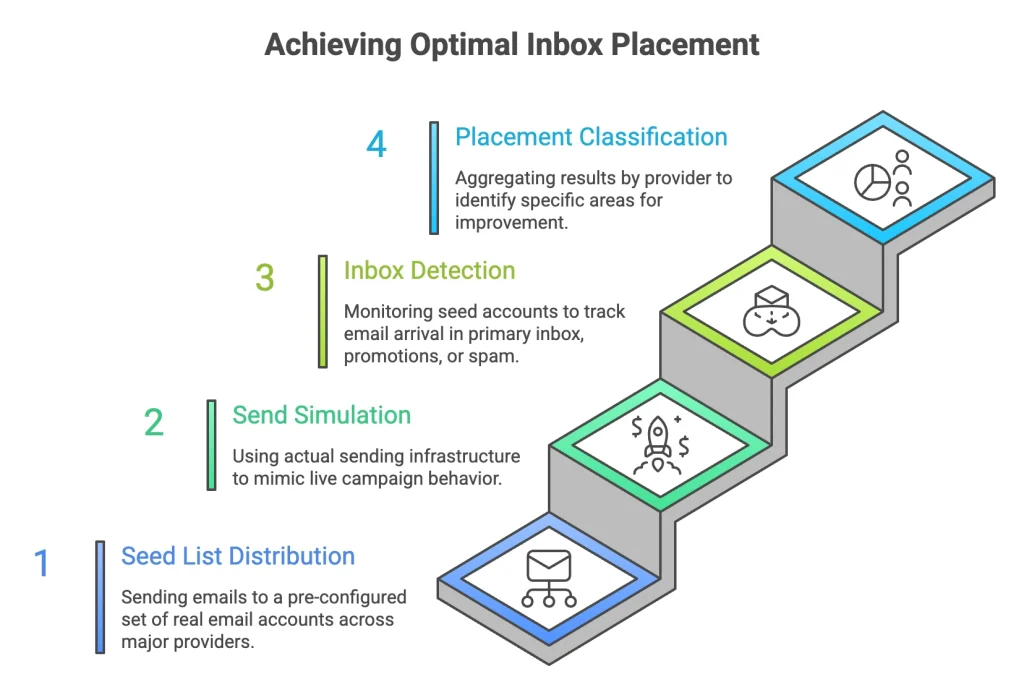
Here is the process broken into four concrete steps:
Step 1: Seed List Distribution A seed list is a pre-configured set of real email accounts across major inbox providers, including Gmail, Outlook, Yahoo, and others. When you run a placement test, your email is sent to these accounts simultaneously, just like a real campaign.
Step 2: Send Simulation Your email goes out through your actual sending infrastructure, using your real domain, IP address, and authentication setup. This matters because the test needs to reflect exactly how your live campaigns behave. A test that bypasses your real sending path gives you useless data.
Step 3: Inbox Detection Each seed account is monitored after delivery. The system checks whether the message arrived in the primary inbox, the promotions or social tab, or the spam folder. Timing is also tracked since delays can indicate filtering activity.
Step 4: Placement Classification Results are aggregated by provider. You get a breakdown showing, for example, that 94% of Gmail accounts received your email in the primary inbox while only 61% of Outlook accounts did. That provider-level split tells you exactly where your reputation problem sits and what needs to be fixed first.
Gmail and Outlook behave very differently. Gmail relies heavily on engagement signals and machine learning trained on billions of user interactions. Google’s official sender guidelines require bulk senders to have SPF, DKIM, and DMARC configured, maintain spam rates below 0.3%, and support one-click unsubscribe. Outlook, on the other hand, leans more on IP reputation and its SmartScreen filtering system, which is why Microsoft SNDS exists specifically to give senders visibility into how Outlook scores their IP. A placement test surfaces these provider-level differences so you can address them specifically instead of guessing.
E-Warmup runs its placement testing through a network of 40,000+ real inboxes. These are not synthetic addresses. They are real accounts with real engagement histories, which means the placement signals they generate are accurate to how actual subscribers’ inboxes behave.
Why Are Your Emails Going to Spam Despite High Delivery Rate?
Emails land in spam despite high delivery rates because inbox providers evaluate sender reputation and engagement, not just delivery success. Spam folder placement is the silent killer of email performance: your dashboard shows a healthy send, while a large portion of your list never sees the message at all.
The delivery handshake happens in milliseconds. The spam filtering decision draws on weeks or months of behavioral data about your sending domain and IP. A high delivery rate simply means you got past the door. It says nothing about what happened inside.
Here is how to diagnose the specific cause:
If your placement suddenly dropped after a volume increase: You outpaced your warmup. Inbox providers became suspicious of the sudden spike and started filtering aggressively.
If placement is consistently low across all providers: Your domain or IP has accumulated negative reputation signals. Check blacklists, review bounce rates, and look at whether your engagement metrics have been declining for several months.
If Gmail is fine but Outlook is sending you to spam: Your IP reputation scores differently across providers. Outlook uses Microsoft’s SmartScreen reputation system, which weights authentication and IP history heavily. Microsoft’s SNDS dashboard can show you exactly how your IP is being scored so you can diagnose the issue directly rather than guessing.
If placement drops on a specific campaign but not others: The content or list segment used in that campaign triggered filters. Check for spam trigger words, broken authentication headers, or a segment with low historical engagement.
If you just started sending from a new domain: You have no reputation at all. Research from The Digital Bloom’s 2025 B2B deliverability report shows that new domains face roughly a 30-percentage-point placement penalty compared to mature, well-established domains. Warmup is not optional. It is the only path to reliable placement.
The core rule: spam filtering is a reputation decision, not a content decision. Content matters, but reputation is the primary driver. Fix the root signal, not just the symptoms.
What Factors Actually Affect Inbox Placement?
Authentication (SPF, DKIM, DMARC)
SPF tells receiving servers which IPs are authorized to send on behalf of your domain. DKIM cryptographically signs your email so providers can verify it has not been tampered with. DMARC tells providers what to do when SPF or DKIM fails. Without all three configured correctly, your email looks untrustworthy before inbox providers even evaluate anything else.
The data here is stark. According to research compiled by The Digital Bloom, fully authenticated domains using DMARC are 2.7 times more likely to reach the inbox compared to unauthenticated ones. Yet only 7.6% of domains currently enforce a DMARC policy at quarantine or reject level. That gap is where most senders lose placement without ever knowing why.
Starting from February 2024, Google requires all bulk senders to have SPF, DKIM, and DMARC configured if they send 5,000 or more messages per day to Gmail accounts. Microsoft followed with similar requirements in May 2025. These are now mandates, not suggestions.
Sender Reputation
Sender reputation is a score assigned by each inbox provider to your sending domain and IP, based on how recipients interact with your mail over time. That score reflects your complaint rate, bounce rate, engagement history, and spam trap hits. It takes weeks to build. It can be damaged in a single bad send to a stale list.
Google Postmaster Tools gives you a direct view of how Gmail scores your domain reputation, breaking it into four tiers: Bad, Low, Medium, and High. Monitoring this free tool regularly is one of the fastest ways to catch reputation damage before it collapses your placement rate.
Domain Warmup
A brand new domain starts with zero reputation. Sending high volumes from an unwarmed domain triggers immediate suspicion from inbox providers. Warmup is the process of gradually increasing volume while generating positive engagement signals so providers learn to trust your domain before you scale.
List Quality
Sending to inactive, outdated, or purchased lists drives up hard bounces and spam complaints. Both directly damage your sender reputation. Stripo’s 2026 deliverability statistics found that around 39% of email marketers rarely or never clean their contact lists, which directly contributes to placement degradation over time. Clean lists with high engagement rates are the foundation of good placement.
Behavior Signals
Inbox providers track what happens after your email lands. Do recipients open it? Reply to it? Move it to their primary folder? Or do they delete it unread, mark it as spam, or ignore it? Every one of these actions feeds into how providers classify your future mail. Strong positive engagement signals are one of the most powerful forces available to improve placement over time.
Each of these factors connects directly to placement. They are not general best practices. They are the actual inputs the algorithm uses.
How to Improve Your Inbox Placement Rate (Action Framework)
To improve your inbox placement rate, you need to fix authentication, warm up your domain, and continuously monitor sender reputation.
Here is the step-by-step system:
Step 1: Fix Authentication
Verify that SPF, DKIM, and DMARC are all configured correctly. Use a DMARC analyzer to confirm your policy is set to at least p=quarantine. Misconfigurations here invalidate everything downstream. Use Google’s Sender Guidelines to verify your DNS setup requirements, and Microsoft SNDS to confirm your IP’s standing with Outlook.
Step 2: Start Structured Warmup
If your domain is new or your sending volume has been inconsistent, begin a warmup sequence. Start with small volumes (50 to 100 emails per day) to your most engaged segment, then increase volume by roughly 20% every two to three days. Do not rush this. Attempting to skip the warmup to save time is the most common reason new domains land directly in spam.
Step 3: Simulate Real Engagement
Warmup only works if the engagement signals are genuine. Seed list warmup, the practice of sending to a controlled network of real inboxes that actively engage with your mail, teaches providers that your emails generate positive behavior. E-Warmup does this automatically with its 40,000+ inbox network, generating real engagement signals that providers recognize and respond to.
Step 4: Clean Your Lists
Remove hard bounces immediately. Suppress contacts who have not engaged in 90 days or more. Run a re-engagement sequence before you archive long-inactive contacts. A smaller, engaged list beats a large, cold one every time. According to Google’s sender guidelines, spam complaint rates above 0.3% will trigger active filtering. List quality is your first line of defense against hitting that threshold.
Step 5: Monitor Domain Health
Check your domain against major blacklists weekly. Use an email monitoring tool to track your sending IP reputation, blacklist status, and domain health in one place. Google Postmaster Tools and Microsoft SNDS are the free provider-level options. Catch problems early, before they snowball into full placement collapse.
Step 6: Test Before You Send
Run a placement test before every major campaign. This is not optional if you care about your open rate. Sending without testing is sending blind.
E-Warmup combines all of these steps into one system. You get placement testing, structured warmup, and real engagement simulation from the same platform, so you are not juggling five different tools to manage one deliverability problem.
When Should You Run an Inbox Placement Test?
You should run an inbox placement test before every email campaign to avoid sending emails that will land in spam.
More specifically, run a placement test in these situations:
Before every campaign.
This is the baseline rule. You should know your placement score before you send to your full list, not after.
After any domain or IP change.
Switching sending infrastructure resets your reputation signals. A placement test confirms your new setup is working as expected before you scale volume.
After completing the warmup.
Warmup is preparation, not a guarantee. A post-warmup placement test tells you whether your domain is actually ready for full volume sends.
When open rates drop suddenly.
A placement drop often precedes an open rate drop. If your opens have declined without an obvious content reason, your placement rate may have already deteriorated without your knowledge.
After authentication changes.
Any time you update SPF, DKIM, or DMARC records, run a placement test to confirm the changes propagated correctly and did not introduce alignment issues that break your authentication.
Before any cold outreach sequence.
An email spam test before you start a new outreach campaign tells you whether your domain is ready to handle volume without landing in junk folders.
Making placement testing a regular part of your send process is the difference between managing deliverability proactively and discovering problems only after they have already cost you significant reach.
Pre-Send Inbox Placement Checklist
Use this checklist before every campaign send:
- SPF record is configured and valid
- DKIM signing is enabled and verified
- DMARC policy is set to at least
p=quarantine - Domain is fully warmed (if new or recently reactivated)
- Email list has been cleaned of hard bounces and long-inactive contacts
- The sending segment has strong historical engagement signals
- Domain health is clean: no blacklist flags, no sudden reputation drops
- Inbox placement test has been run and the results reviewed
- Placement score is above 85% before sending at scale
- Google Postmaster Tools shows High or Medium domain reputation
- Microsoft SNDS shows a green filter result for your sending IP
If any box is unchecked, pause. Fix it. Then test again.
Why Most Email Campaigns Fail Without Placement Testing
“Sent successfully” is not success. It is a server handshake.
Most senders have no visibility into where their mail actually lands. They write a subject line, hit send, and wait. When the open rate comes back low, they blame the subject line or the send time or the offer. They never consider that 35% of their list never saw the email at all.
The numbers tell the real story. According to Landbase’s 2026 deliverability statistics, the average inbox placement rate across all senders sits around 83.1%, meaning roughly one in six marketing emails never reaches the inbox. That is a structural revenue leak baked into every campaign that skips placement testing.
Blind sending is the default for most email programs. That is why average open rates hover where they do. The senders who outperform do not have better subject lines. They have better inbox placement. They test before they send. They know their placement score before their subscribers do.
If you are not testing placement, you are guessing. And in email, guessing costs you revenue.
How E-Warmup Fixes Inbox Placement Faster
E-Warmup is built specifically to solve inbox placement problems, not just monitor them. As an email deliverability tool, it goes beyond tracking metrics and actively fixes the conditions that cause poor placement.
The platform connects your sending domain to a network of 40,000+ real inboxes across all major providers. Those inboxes generate real engagement signals: opens, replies, and folder movements. Inbox providers see your mail being received positively and adjust your reputation accordingly.
The result is a structured, accelerated warmup paired with real-time placement testing. Customers using E-Warmup reach inbox placement rates of up to 98%, and they maintain those rates with ongoing monitoring and engagement simulation.
The key difference between E-Warmup and basic warmup tools is the engagement layer. Sending to seed inboxes that sit idle does not build reputation the same way that sending to inboxes with active engagement histories does. Providers can distinguish between inactive seed accounts and real human behavior. E-Warmup uses real engagement patterns that providers actually respond to, not surface-level signals that stop working the moment volume scales.
Frequently Asked Questions
What is an inbox placement test?
An inbox placement test is a pre-send diagnostic that shows where your emails land across real inboxes, including primary, promotions, or spam folders, before you send to your actual list.
What is a good inbox placement rate?
A good inbox placement rate is above 90%. Anything between 70% and 89% is a risk zone that requires investigation. Below 70% signals serious deliverability problems that need to be fixed before any high-volume sending.
How often should I run inbox placement tests?
Run a placement test before every campaign send. Also run one after any infrastructure change, after completing warmup, and whenever open rates decline unexpectedly.
Why are my emails going to spam?
Emails go to spam because inbox providers evaluate sender reputation and engagement signals, not just delivery mechanics. Common causes include poor authentication, low engagement rates, sending from an unwarmed domain, or landing on blacklists.
Does inbox placement affect open rates?
Yes, directly. Emails that land in spam are almost never opened. Emails in the promotions tab see significantly lower open rates than primary inbox placement. Your open rate is a downstream consequence of your placement rate.
What tools can test inbox placement?
Tools like E-Warmup, GlockApps, and MXToolbox offer inbox placement testing features. For monitoring your reputation with Gmail, Google Postmaster Tools is free and essential. For Outlook, Microsoft SNDS gives you IP-level reputation data directly from Microsoft’s filters. E-Warmup combines placement testing with active warmup and engagement simulation in one platform, which is the most effective combination for improving and sustaining placement rates.
Conclusion
Inbox placement is visibility. Visibility is open. Everything else comes after.
You can write the best subject line in the industry. You can time your send to the minute. You can segment your list down to a single persona. None of it matters if your email lands in spam.
Inbox placement testing is what makes all of that work count. It is also the most direct path to improve email deliverability in a measurable, repeatable way. Run the test. Fix the issues. Then send.
