

There’s a moment every cold email sender knows. The campaign goes out, the open rate comes back, and it’s half of what it should be. You check your content, your subject line, and your send time. Everything looks fine on paper.
What you’re looking at is a warmup problem. And it’s one of the most common reasons well-built outreach campaigns quietly fail before anyone opens the first email.
Email warmup is the process of building sender trust with inbox providers before you send at volume. It’s not optional. Gmail, Outlook, and Yahoo treat new or unestablished domains as high risk by default, and the only way to change that is to earn it.
This guide explains how email warmup works, how long it takes, what a real warmup schedule looks like, and what separates the domains that hit primary inboxes from the ones that don’t. Every cluster topic below has a dedicated deep-dive linked where relevant.
What Is Email Warmup?
Email warmup is the process of gradually increasing your sending volume from a new or inactive domain while simultaneously generating positive engagement signals: opens, replies, inbox moves, that inbox providers use to establish sender trust.
Email warmup defined: The practice of sending low volumes of email from a new domain on a controlled schedule, building sending history and positive engagement signals so that inbox providers like Gmail, Outlook, and Yahoo classify the domain as a legitimate sender before high-volume campaigns begin.
When you register a new domain, it has zero sending history. No reputation. No relationship with inbox providers. Email service providers treat new sending accounts with suspicion by default. Spammers frequently create new accounts to bypass filters, so providers have no reason to trust an unfamiliar domain until behavioral patterns prove otherwise.
Warmup changes that. It moves your domain from unknown to trusted by building the kind of sending history that inbox providers use to make classification decisions. Without it, even clean content and correct authentication can’t save your inbox placement.
Why Email Warmup Matters in 2026
Inbox providers have gotten significantly stricter in the last two years. Google introduced mandatory SPF and DKIM authentication for bulk senders, a one-click unsubscribe requirement for marketing messages, and dropped the spam complaint threshold from 0.3% to 0.1%. Just one complaint per thousand emails now puts your domain at risk.
The consequence for new domains is direct. New domains face roughly a 30 percentage point inbox placement penalty compared to mature domains. A new domain sending 100,000 emails achieves inbox placement for approximately 55,000 messages, while a mature domain with full authentication reaches 85,000. That gap is not a content problem. It’s a trust problem. And warm-up is how you close it.
Reputation is shaped by engagement rates, bounce rates, spam complaints, and how steady your sending pattern looks over time. Warmup helps establish early positive signals by creating real interactions and avoiding the behaviors that damage trust. A strong reputation makes inbox placement predictable. A weak one makes every campaign harder than it needs to be.
The email warmup tool market reflects how seriously teams now take this. The market size for email warmup tools was estimated at around $200 million in 2024 and is projected to reach $600 million by 2033. That’s not a niche product category. That’s infrastructure.

How Email Warmup Works: The Mechanics
Warmup works by exploiting the same signals inbox providers use to evaluate every sender: engagement patterns, volume consistency, complaint rates, and authentication status.
When a warmup tool sends emails from your domain, real inboxes in the warmup network receive them, open them, reply to them, and move them out of spam if they land there. To Gmail and Outlook, this looks like a sender whose emails people read and respond to. That’s exactly the signal they need to start trusting your domain.
Gmail’s spam filtering is more advanced than any other major provider and places a heavier weight on engagement signals like reply rates and spam rescues. Outlook has been stricter on authentication since late 2025, treating DMARC p=none as equivalent to no DMARC for reputation scoring.
The two things that separate effective warmup from ineffective warmup are the quality of the inbox network and the authenticity of the engagement signals. Fixed IP seed list warmup has been flagged and discounted by major providers. AI-powered warmup using real, diverse inboxes generates the variable engagement patterns that actually build lasting reputation.
E-Warmup runs AI-powered warmup across a network of 5,000+ real inboxes. The 98% inbox placement rate users achieve on warmed domains reflects what genuine engagement signals, built gradually, actually produce.
How to Warm Up an Email Account: The Basic Process
Here’s the foundation.
Before the warm-up begins, three things need to be in place:
- SPF record published and passing
- DKIM signature configured and aligned with your sending domain
- DMARC record published at minimum p=none with a reporting address active
Without these, no warmup will fix your deliverability. Authentication is the baseline that warmup builds on top of.
Once authentication is confirmed, the process follows this sequence:
Step 1: Connect your inbox to a warmup tool. Choose a tool that uses real inboxes, not fixed seed lists. Connect your email account via SMTP, Gmail, or your ESP’s API.
Step 2: Set your daily warmup volume. Start at 10 to 20 emails per day. The tool handles sends and replies automatically in the background.
Step 3: Let the ramp run. Volume increases gradually over the warmup period. The tool manages the schedule. Your job is to not send cold campaigns during active warmup.
Step 4: Monitor your inbox placement score. Before launching any real campaign, run an inbox placement test. A primary inbox above 90% is the green light. Below that, extend the warmup.
Step 5: Keep warmup running alongside real sends. The ongoing engagement signals buffer against the variability of cold recipients and protect the reputation you’ve built.
The cluster post covers each step with annotated screenshots showing exactly what the E-Warmup dashboard looks like at each stage, including what inbox placement scores look like before warmup, at the midpoint, and when the domain is ready to send.
How Long Does Email Warmup Take?
This is the question every sender asks, and the honest answer is: it depends on your target volume and your starting point.
Email warmup typically takes 14 to 21 days for a new domain to safely reach 50 emails per day. To scale outreach to 200 or more daily sends, a full 4 to 6-week warmup cycle is required. Readiness is confirmed by an inbox placement rate above 90% and a sender reputation score above 80.
For high-volume senders with more aggressive targets, the timeline extends further. High-volume senders targeting millions of messages per month may need twelve weeks or more to warm up safely. The warmup period is not defined by a fixed number of days, but by reaching your target volume while maintaining healthy metrics throughout.
The data from E-Warmup’s platform across 85,000+ domains shows consistent patterns: domains that rush the ramp see reputation damage that takes longer to repair than the warmup they skipped. Two to four weeks for moderate volume. Four to six weeks for aggressive outreach. No shortcuts that actually hold.
What a Real Email Warmup Schedule Looks Like
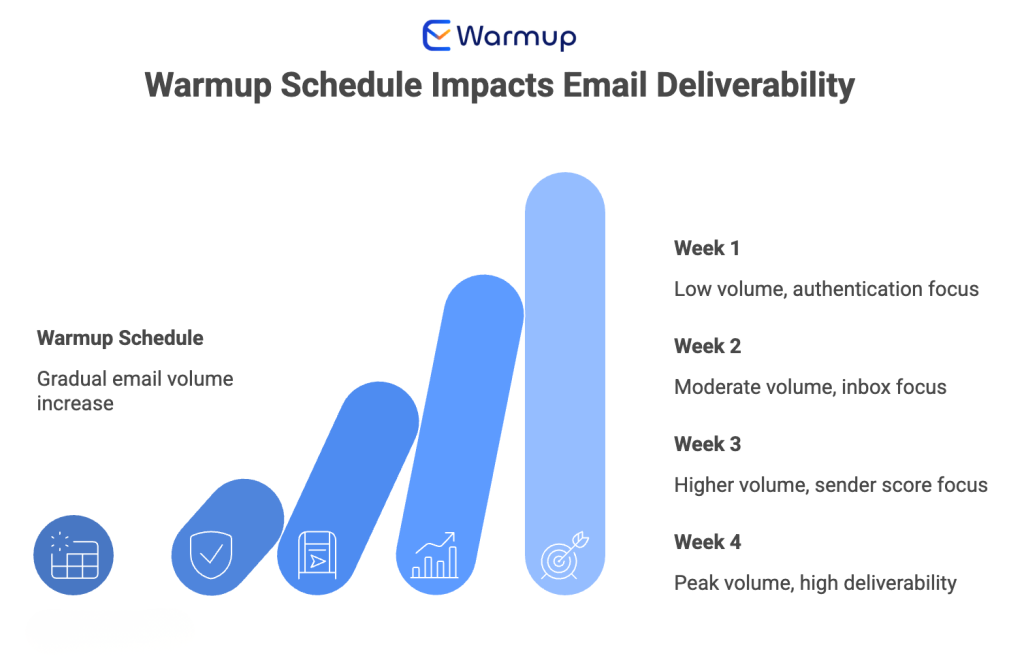
A warmup schedule is the day-by-day sending plan that controls how volume increases across the warmup period. The goal is a gradual, consistent ramp with no sudden jumps.
Here’s what a standard 4-week schedule looks like for a new cold email domain:
| Week | Daily Warmup Emails | Daily Cold Sends | Target Metric |
| Week 1 | 10-20 | 0 | Authentication passing, no spam placement |
| Week 2 | 20-40 | 0-10 (safe list only) | Inbox placement above 80% |
| Week 3 | 40-70 | 20-50 | Inbox placement above 85%, sender score above 70 |
| Week 4 | 50-100 | 50-150 | Inbox placement above 90%, sender score above 80 |
Never send more than double the previous day’s volume during active scaling. As volume climbs, reduce the multiplication factor. Under 100 emails daily, 2x increases work. Between 100 and 500, slow to 1.5x. Above 500, drop to 1.25x.
Gmail Warmup: Why It Works Differently from Other Providers
Not all inbox providers score warmup the same way. Gmail is the most important to get right, and it’s also the most demanding.
Gmail has the most sophisticated spam filtering of any major provider. Its AI evaluates engagement signals, content patterns, sending history, and authentication all at once. Gmail places a heavier weight on engagement signals like reply rates and spam rescues.
For Gmail specifically, three things matter more than they do on other providers. First, reply rate. An email that receives a reply is a strong trust signal. Gmail’s algorithm weights this heavily in reputation scoring.
Second, spam rescue rate. When warmup emails land in spam and get moved to the inbox by the recipient, Gmail reads this as a direct signal that the sender belongs in the inbox.
Third, authentication alignment. Gmail now enforces DMARC more aggressively than it did before 2024, and DKIM alignment is checked at every send.
Warming a Gmail account itself, as opposed to a custom domain sending through Gmail, introduces additional technical constraints.
Primary Domain vs Cold Email Domain: Which One Do You Warm Up?
This is a strategy question that affects every outreach team, and most get it wrong the first time.
Your primary domain is the domain your business lives on. Your website, your brand, your team’s day-to-day email. It has years of sending history, authentication records, and domain reputation built up over time. That reputation is an asset.
A cold email domain is a separate domain set up specifically for outbound outreach. Its only job is to carry the volume and risk of cold email campaigns and absorb the reputation consequences if something goes wrong.
The answer to which one you warm up is almost always: warm the cold email domain, and protect the primary.
If your primary domain’s reputation takes damage from aggressive cold outreach — high complaint rates, spam placements, blacklist listings — it affects every email your business sends. Your transactional emails. Your customer communications. Your team’s day-to-day correspondence. The blast radius is wide.
A dedicated cold email domain keeps that risk contained. You warm it up, you use it for outreach, and if it takes damage, you replace it without touching your primary domain’s reputation. Organizations with full SPF, DKIM, and DMARC enforcement plus aged domains consistently achieve 85 to 95% inbox placement. That applies equally to primary domains and cold email domains.
Free Email Warmup vs Paid: What the Difference Actually Costs You
There are free warmup options available. Some tools offer free tiers. A handful are free entirely. The question is whether free warmup actually does the job.
Free warmup tools typically operate with one or more of these limitations: fixed seed list networks that major providers have learned to identify, low daily volume caps that extend your warmup timeline significantly, no inbox placement testing to confirm readiness before you send, and no monitoring for blacklist status or reputation drops during the ramp.
The practical consequence shows up in inbox placement. Free warmup builds some reputation. But the engagement signals it generates are often less diverse, less consistent, and more recognisable to spam filters than what a paid tool with a real, rotating inbox network produces.
The calculation is straightforward. If a free tool reduces your inbox placement by 10 percentage points on a campaign of 10,000 sends, that’s 1,000 emails that went to spam instead of the inbox. At any conversion rate, the cost of that gap exceeds the cost of a paid tool.
How to Choose an Email Warm Up Tool
The warmup tool market has grown significantly, and quality varies considerably. Here’s what separates tools that build real reputation from tools that generate the appearance of warmup without the results.
Real inboxes vs seed lists. The single most important factor. A real inbox network generates diverse, human-like engagement from accounts that inbox providers haven’t already identified as warmup infrastructure. Fixed seed lists are detectable and increasingly discounted by Gmail and Outlook’s filtering systems.
AI-powered scheduling. Good warmup tools don’t follow a fixed daily schedule. They vary timing, volume, and engagement patterns in ways that mirror real sending behaviour. Predictable, rigid schedules look automated.
Inbox placement testing. A warmup tool that doesn’t tell you whether your warmup is actually working isn’t a complete solution. Integrated inbox placement testing before every campaign send is a non-negotiable feature.
Multi-ESP support. If you send via Gmail, Outlook, SMTP, SendGrid, or Amazon SES, your warmup tool needs to support all of them. Warmup that only works on one ESP creates gaps in the reputation picture.
Monitoring and alerting. Warmup doesn’t end when you start sending. Ongoing reputation monitoring, blacklist detection, and authentication checks protect what you’ve built.
E-Warmup provides AI-powered warmup across 5,000+ real inboxes, integrated inbox placement testing, real-time monitoring, and support for all major ESPs. Setup takes under 30 seconds.

Email Warmup for Agencies: What Changes at Scale
Individual senders and agency teams face different warm-up challenges. Managing warmup for a single domain is operationally straightforward. Managing warmup across 50+ client inboxes simultaneously is a different problem entirely.
The core challenges at agency scale are inbox tracking across multiple clients, staggered warmup timelines that don’t all start on the same day, different ESP configurations per client, and reporting that clients can actually understand without a deliverability background.
The tools and workflows that work for an individual sender don’t necessarily scale to agency operations. The metrics that matter — inbox placement per client domain, reputation score per inbox, blacklist status per sending domain — need to be visible in a unified dashboard, not spread across individual tool logins for each account.
For agency teams managing 50 or more client inboxes, E-Warmup’s multi-inbox dashboard provides centralised warmup management, per-domain monitoring, and client-level reporting from one account.
Email Warmup Pre-Send Checklist
Before moving from warmup to live campaigns, run through these. Do not send until all of these pass.
- SPF, DKIM, and DMARC all configured and passing
- Domain age at least 14 days before warmup started
- Warmup ran for a minimum 2 weeks for low volume, 4 weeks for aggressive outreach
- Inbox placement test completed across Gmail, Outlook, and Yahoo
- Primary inbox placement above 90% on test results
- Sender reputation score above 80 on Google Postmaster Tools
- Domain not listed on any major blacklists
- Daily warmup still running alongside first real sends
- Cold send volume starting at 20% or less of warmup volume on day one
- Spam complaint rate from warmup period below 0.1%
Frequently Asked Questions
What is email warmup?
Email warmup is the process of gradually increasing sending volume from a new or inactive domain while generating positive engagement signals — opens, replies, inbox moves — that inbox providers use to classify your domain as a legitimate sender. It builds the sending history that Gmail, Outlook, and Yahoo need to trust your domain before high-volume campaigns begin.
How long does email warmup take?
A new domain needs 14 to 21 days to safely reach 50 emails per day. Scaling to 200 or more daily sends requires a full 4 to 6-week warmup cycle. Readiness is confirmed by inbox placement above 90% and a sender score above 80, not by days elapsed.
Do I need to warm up an existing domain?
If your domain has been sending consistently with healthy metrics, warmup is less critical. But if there’s been a sending gap of 30 days or more, a volume spike is planned, or your inbox placement has dropped, a structured re-warmup period is the right call. Treat it as maintenance, not just setup.
Can I send cold emails while warming up?
Not during the first two weeks on a new domain. Sending cold campaigns before warmup is complete undermines the reputation you’re building. After week two, low volumes to highly engaged contacts are acceptable, but full cold campaigns should wait until inbox placement tests confirm readiness.
What’s the difference between manual and automated email warmup?
Manual warmup involves personally sending emails and managing replies on a daily schedule across the full warmup period. Automated warmup tools handle the schedule, the sends, and the engagement automatically, running in the background without daily management. Check out Why AI-Powered Email Warmup Beats Manual Warmup Every Time
Why is Gmail warmup different from Outlook warmup?
Gmail places heavier weight on engagement signals like reply rates and spam rescues. Outlook has been stricter on authentication since late 2025, treating DMARC p=none as equivalent to no DMARC for reputation scoring. Each provider scores sender trust differently, which is why per-provider inbox placement testing matters throughout warmup.
Does email warmup work for Google Workspace accounts?
Yes, but Google Workspace accounts have specific sending limits and OAuth configuration requirements that affect how warmup tools connect and operate. The full technical setup is covered in our Gmail warmup guide.
Fix Reputation Before You Send. Not After.
Most deliverability problems are discovered in the open rate. By that point, the campaign has already gone out, the damage is already in the inbox providers’ scoring systems, and the recovery takes longer than the warmup would have.
Email warmup is not a technical nicety. It’s the prerequisite for any outreach that needs to reach the inbox consistently. The domains that perform reliably aren’t doing anything different with their content or their lists. They built the foundation first.

E-Warmup automates the full warmup process across 5,000+ real inboxes. AI-powered engagement signals, integrated inbox placement testing, real-time reputation monitoring, and a pre-send health check before every campaign. Setup takes under 30 seconds.
