Most senders set up SPF, DKIM, and DMARC once, usually when a developer or agency configured their domain years ago, and never look at it again. Then a campaign underperforms, or Gmail starts sending everything to spam, and nobody knows where to start looking.
Here’s the thing about SPF, DKIM, DMARC: they’re not one setting. They’re three separate records that each answer a different question for inbox providers, and if even one of them is misconfigured, the other two can’t fully protect you.
This guide breaks down what each record actually does, why Gmail and Yahoo now require them for bulk senders, and how to fix the failures that show up most often. If you’ve never touched your DNS settings, or you inherited a setup from someone who left the company, this is the version that actually makes sense.
By the end, you’ll know exactly what’s working, what’s broken, and what to fix first.
What Each Record Actually Does
Each record protects a different part of the sending process. None of them does the same job, and none of them can substitute for the other two.
SPF: Which Servers Can Send on Your Behalf
An SPF record is a DNS TXT entry that lists every server authorized to send email from your domain. When a message arrives, the receiving server checks whether it came from one of those approved sources. If it didn’t, the message either gets flagged or rejected, depending on the policy.
A basic SPF record looks like this:
v=spf1 include:_spf.google.com include:sendgrid.net ~allThat single line tells inbox providers: Google’s servers and SendGrid are allowed to send as this domain, and anything else should be treated with suspicion.
One rule trips up almost everyone. A domain can only have one SPF record. If a second one gets added later, whether by a new marketing tool or a developer who didn’t check first, authentication breaks for the entire domain. Not just the new sender. Everything.
DKIM: Cryptographic Proof the Message Wasn’t Altered
DKIM (DomainKeys Identified Mail) attaches a digital signature to outgoing emails. The receiving server uses a public key published in your DNS to verify that signature. If the message was altered in transit, even a single character, the signature won’t match, and the check fails.
DKIM answers a different question than SPF. SPF confirms the sending server is authorized. DKIM confirms the message itself is genuine and unmodified. A domain can pass SPF and still fail DKIM if the signing key is missing, expired, or mismatched with the selector in the DNS record.
DMARC: The Policy for What Happens When SPF or DKIM Fail
DMARC (Domain-based Message Authentication, Reporting, and Conformance) sits on top of both. It doesn’t authenticate anything by itself. Instead, it tells receiving servers what to do when a message fails SPF, DKIM, or both.
DMARC has three policy levels:
- p=none — monitor only, no messages are blocked, you just get reports
- p=quarantine — failing messages get routed to spam or junk
- p=reject — failing messages are blocked outright
Most domains should start at p=none, review a few weeks of reports, then move toward quarantine and eventually reject once everything legitimate is passing.
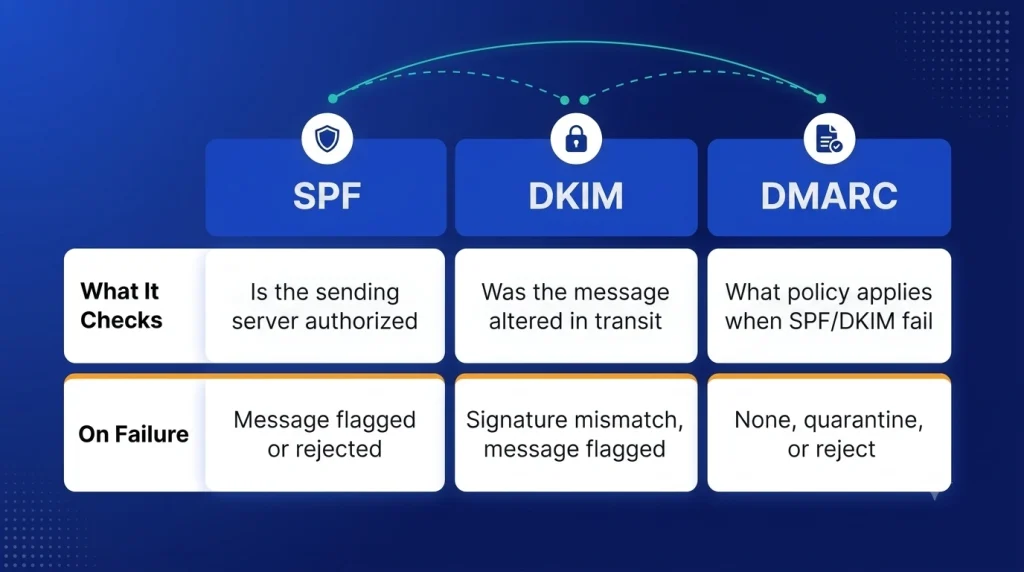
| Record | What It Checks | On Failure |
| SPF | Is the sending server authorized | Message flagged or rejected |
| DKIM | Was the message altered in transit | Signature mismatch, message flagged |
| DMARC | What policy applies when SPF/DKIM fail | None, quarantine, or reject |
Why Gmail and Yahoo Require This Now
In February 2024, Google and Yahoo rolled out new requirements for bulk senders, meaning anyone sending more than 5,000 messages a day to their users. Domains that hit that threshold now need SPF and DKIM in place, plus a published DMARC record at a minimum of p=none, according to Google’s guidance for email senders.
Heading into 2026, these aren’t new rules anymore. They’re the baseline. Enforcement has only gotten stricter, and providers have gotten better at detecting domains that skip authentication or set it up incorrectly.
For cold email teams specifically, this matters more than it might seem. A domain sending 5,000 daily emails without DMARC doesn’t just risk a few flagged messages. It risks bulk filtering across the entire domain, sometimes without any warning before it happens.
A common pattern we see: a domain has SPF and DKIM passing, feels compliant, then gets hit with delivery problems because DMARC was never published at all. Authentication isn’t complete until all three records exist and align.
Setting Up All Three Correctly
Order matters here. Trying to set up DMARC before SPF and DKIM are working is like writing a policy for a system that doesn’t exist yet.
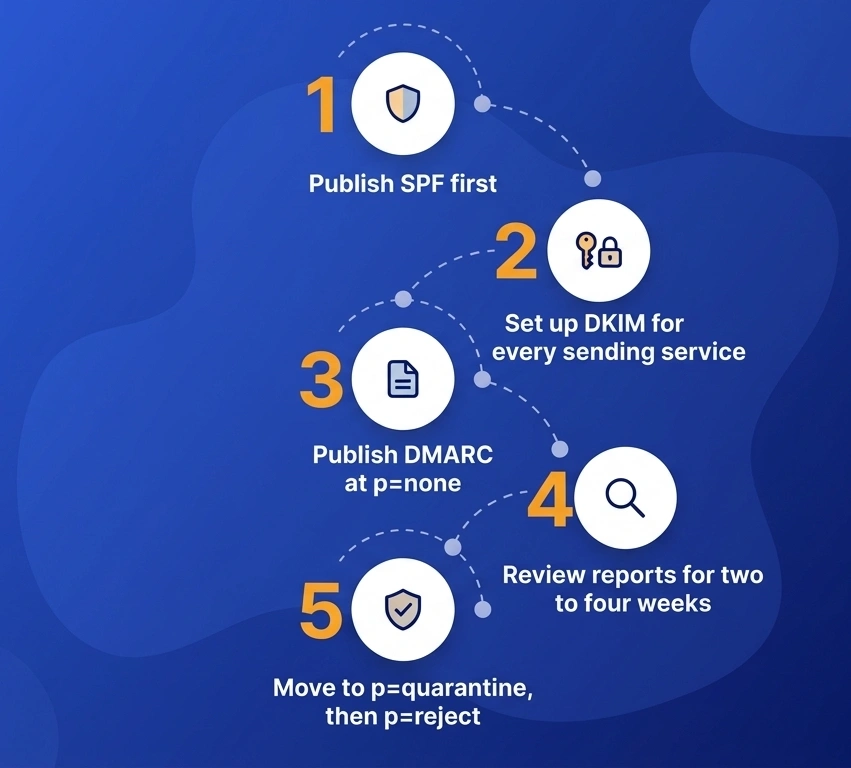
- Publish SPF first. List every service that sends on your behalf, including your email warmup tool, your CRM, and any transactional email provider. Use ~all while testing, move to -all once confirmed.
- Set up DKIM for every sending service. Each platform, Gmail, Outlook, and SendGrid, generates its own DKIM key. Add each one separately. A domain sending through three platforms needs three DKIM records, not one.
- Publish DMARC at p=none. Point the rua reporting address to an inbox you actually check. This is where most of the useful information starts showing up.
- Review reports for two to four weeks. DMARC aggregate reports show exactly which servers are sending mail claiming your domain, and whether they’re passing SPF and DKIM.
- Move to p=quarantine, then p=reject. Only after confirming every legitimate sender is passing. Jumping straight to reject on an unreviewed domain can block your own outgoing mail.
The most common syntax mistake isn’t in DMARC or DKIM. It’s the one-SPF-record rule getting violated because two different teams added SPF entries without checking what already existed.
How These Records Affect Sender Reputation
Authentication is the first thing inbox providers check, but it’s not the only thing that determines where an email lands. Email domain reputation is built over time, through consistent sending behavior, and authentication is simply the entry requirement to be evaluated at all.
Think of it this way. A domain with correct SPF, DKIM, and DMARC is like a job candidate with verified credentials. The credentials confirm the candidate is who they claim to be. They don’t guarantee the candidate gets hired. Sender reputation is the track record that gets built after the first check passes.
Domains with no sending history, even fully authenticated ones, often see spam rates spike in the first two weeks of a new campaign. That’s not an authentication failure. It’s a trust gap that hasn’t been closed yet. Inbox providers are still watching how recipients respond before deciding how much to trust the domain going forward.
This is where a lot of teams get stuck. They treat SPF, DKIM, DMARC as the finish line for email deliverability, when it’s really the starting point.
Common Authentication Failures and Fixes
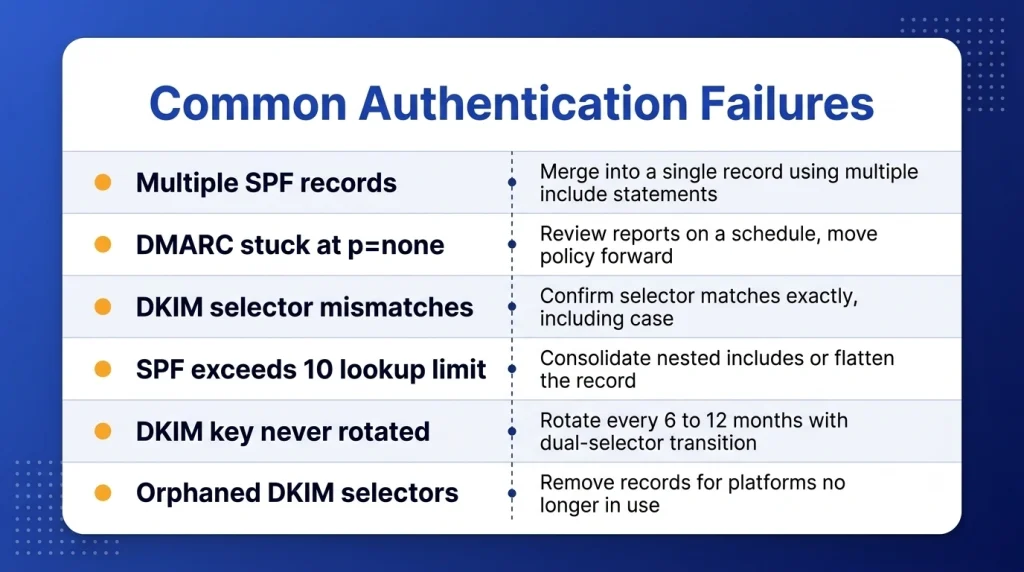
- Multiple SPF records on one domain. Merge them into a single record using multiple include: statements.
- DMARC stuck at p=none indefinitely. Review reports on a schedule, move the policy forward once senders are confirmed clean.
- DKIM selector mismatches. Confirm the selector in your DNS matches exactly what the sending platform expects, including case sensitivity.
- SPF exceeding the 10 DNS lookup limit. Consolidate nested includes or flatten the record where possible.
- DMARC alignment set too strict for the actual sending setup. Use relaxed alignment unless there’s a specific reason to require strict matching.
- New sending tool added without updating SPF. Every new platform that sends on your behalf needs to be added to the SPF record before it goes live, not after deliverability drops.
A domain with a spam complaint rate under 0.1%, the threshold Google references in its sender guidelines, generally has more room to recover from an authentication misstep than one already sitting near that ceiling.
Troubleshooting by Symptom: Passing Authentication, Still Landing in Spam
This is the complaint that shows up most often in deliverability forums and support tickets. SPF passes. DKIM passes. DMARC is aligned. And the email still lands in spam. Here’s how to actually work through it instead of guessing.
Step 1: Confirm what “passing” actually means. Check the raw email headers, not just a dashboard summary. Look for Authentication-Results in the header and confirm SPF, DKIM, DMARC all show pass, not neutral or softfail. A softfail on SPF still counts as a technical pass in some tools’ summaries, but Gmail treats it with more suspicion than a hard pass.
Step 2: Rule out content and structure. Authentication only proves identity. It says nothing about whether your subject line reads like a promotion, whether your link-to-text ratio looks spammy, or whether your HTML is malformed. If authentication checks out clean, the next place to look is content, not DNS.
Step 3: Check sending volume against domain age. A domain that’s authenticated correctly but suddenly sends 2,000 emails in a day after sending 20 a day for months will trigger volume-based filtering regardless of how clean the records are. Providers watch for sudden spikes as a spam signal independent of authentication status.
Step 4: Look at engagement history, not just authentication history. This is the one most teams miss. Gmail and Outlook both weigh how recipients have interacted with your domain’s previous mail. If your last few campaigns had high delete-without-open rates or spam complaints above the 0.1% threshold Google flags in its sender guidelines, that history follows the domain even after authentication is fixed.
Step 5: Check if you’re on a blacklist. Authentication and blacklist status are unrelated. A domain can pass SPF, DKIM, and DMARC perfectly and still be listed on a spam blacklist because of past behavior, a compromised sending account, or a shared IP with a bad reputation. Run a blacklist check separately. This is not something DMARC reports will surface.
Step 6: Rule out shared infrastructure issues. If you’re sending through a shared IP pool, common with some ESPs, someone else in that pool with poor sending habits can drag down deliverability for everyone sharing it, aside from authentication. Dedicated IPs remove this variable but only make sense once volume justifies the cost.
The pattern underneath all six steps: authentication is a gate, not a guarantee. Once you’re through the gate, providers are still watching everything else you do.
Authentication FAQ

Where This Leaves You
SPF, DKIM, DMARC together confirm one thing: that your emails are genuinely from you, and haven’t been tampered with. That’s necessary, and as of 2024, it’s required by the providers that matter most. But it’s not the same as being trusted.
Sender reputation gets built through actual sending history, the kind that develops after authentication is already correct. That’s a separate layer, and it’s the one most teams underestimate. We’ve written about how that process works in our complete guide to email warmup.
E-Warmup monitors SPF, DKIM, DMARC continuously, flagging drift before it affects placement, alongside checking your domain against 100+ blacklists and tracking inbox placement across our network of 5,000+ real inboxes. Authentication tells providers who you are. The rest of the work is what tells them you’re worth trusting.
Check your authentication setup for free, forever. No card required.