
The error “User is authenticated but not connected” (sometimes appearing as “BAD User is authenticated but not connected” or similar) is a fairly common but frustrating issue that pops up almost exclusively when using third-party email clients (Thunderbird, eM Client, Mailbird, Evolution, Vivaldi Mail, etc.) to connect to Outlook.com, Hotmail.com, @live.com, or Microsoft 365 / Office 365 accounts via IMAP.
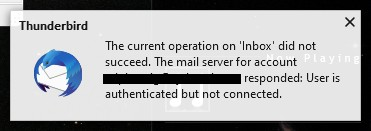
It almost never appears in the official Outlook desktop/mobile apps or outlook.com web interface. The root cause is usually a combination of:
- A long-standing bug/limitation in Microsoft’s IMAP implementation on Exchange Online / Outlook.com servers
- OAuth2 token handling quirks
- Network/protocol mismatches (especially IPv6 related in some cases)
- Server-side temporary glitches or strict security checks
This has been reported for years (even back to 2014) and still occurs in 2024–2026.
Who Usually Sees This Error?
- Thunderbird users (very frequent after updates or new setups)
- eM Client, Mailbird, Evolution, custom scripts/apps using IMAP
- People who recently changed password, enabled 2FA, or switched to app passwords
How to Fix It – Step-by-Step Solutions (Most to Least Recommended)
1. Switch to Exchange / Microsoft 365 protocol instead of IMAP (Best & most reliable fix in 2024–2025) Many modern clients now support the Exchange (or “Microsoft 365”) account type, which uses EWS / ActiveSync / MAPI-over-HTTP instead of IMAP. This completely bypasses the buggy IMAP code on Microsoft’s side.
- Thunderbird: Use “Add Mail Account” → enter email → let it auto-detect (it often picks Exchange now). If not, choose “Exchange” manually or install the Owl addon for better Exchange support.Mailbird: Go to Settings → Accounts → edit account → change protocol to Exchange (not IMAP).eM Client: Remove account → Add new → choose “Microsoft 365” or “Exchange”.Other clients: Look for “Exchange”, “Office 365”, or “Microsoft 365” account type.
2. Re-add the account completely
- Remove / delete the account from your email client
- Close and restart the client
- Add it again (preferably using OAuth2)
- During login, use the browser popup to sign in to Microsoft (don’t enter password directly in the client if possible)
Many times this clears stale tokens or cached session issues.
3. Force IPv4 only (disable IPv6 temporarily) This has surprisingly fixed it for many Thunderbird users over the years.
- Windows: Network Settings → Adapter properties → uncheck IPv6 → restart PC and email client.
- Thunderbird advanced: about:config → network.dns.disableIPv6 → set to true → restart Thunderbird.
- Test again. Re-enable IPv6 later if everything works.
4. Change authentication method (if using manual setup)
- Try switching from OAuth2 → “Normal password” (and use an app password if 2FA is enabled)
- Or the opposite: force OAuth2 if it’s set to basic auth.
- Incoming server: outlook.office365.com port 993 SSL/TLS
- Outgoing: smtp-mail.outlook.com port 587 STARTTLS
Most Important: Make sure “IMAP is enabled” for your Outlook/Hotmail
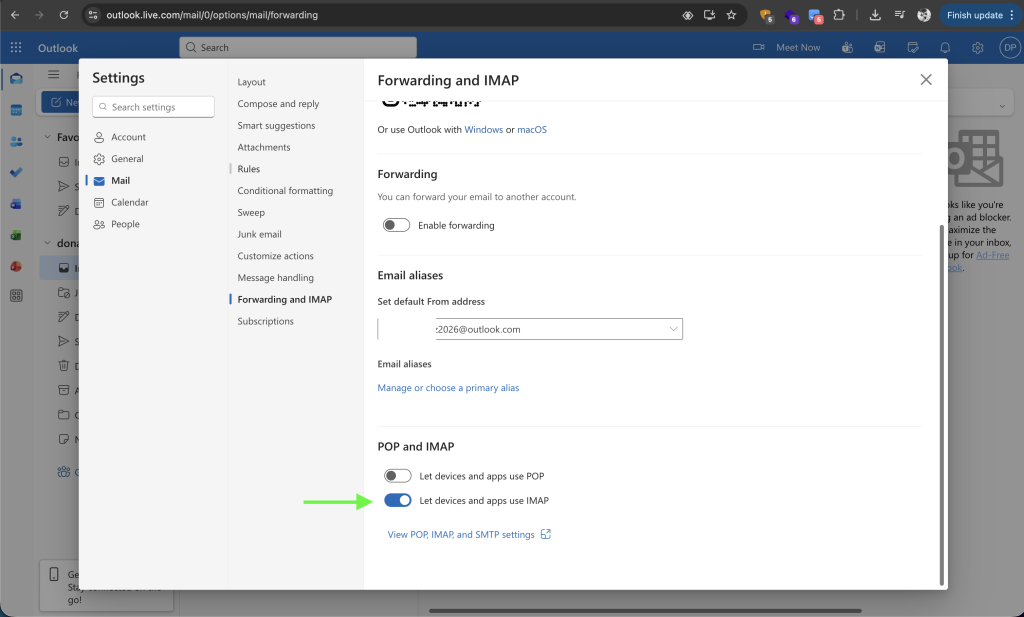
That’s it.
Ready to eliminate email deliverability headaches?
Give E-Warmup a try for free today! Automated warmup and monitoring tools ensure smooth email flow and maintain a stellar sender reputation.
