
- What Is an Email Warmup Tool?
- Why New Domains Need Email Warmup
- How Email Warmup Works Behind the Scenes
- Manual Email Warmup vs Automatic Email Warmup
- How Long Should You Warm Up Email?
- The Problem with Basic Email Warmup Tools
- What to Look for in an Email Warmup Tool
- How E-Warmup's AI Email Warmup Works
- Email Warmup Best Practices Before Scaling Outreach
- Common Email Warmup Mistakes That Hurt Deliverability
- Can You Actually Skip Email Warmup?
- Frequently Asked Questions
- Conclusion
Most cold email campaigns don’t fail because of bad copy. They fail because the emails never reach the inbox. According to Unspam’s 2025 Email Deliverability Report, only 60% of emails reach a visible mailbox globally, with 36% landing in spam or promotions folders — even from senders with strong deliverability scores.
Mailbox providers like Gmail and Outlook run every incoming sender through a trust evaluation before deciding where that email lands. New domains between zero and three months old suffer roughly a 55% inbox placement penalty compared to mature domains sitting at 85%.
It doesn’t matter how good the offer is or how clean the list is. A domain with no reputation gets treated like a threat. Most teams don’t even realize it’s happening — emails go out, open rates sit at zero, and the assumption is that the copy was off or the timing was wrong.
An email warmup tool fixes this by gradually building your sender reputation through simulated, authentic engagement, so that when your real campaigns go out, the inbox is already expecting you. This guide covers how warmup works, how long it takes, what separates good tools from bad ones, and exactly how to run the process before scaling.
What Is an Email Warmup Tool?
An email warmup tool is software that automatically builds sender reputation for a domain by exchanging emails within a network of real inboxes, generating the engagement signals that mailbox providers use to determine whether a sender is trustworthy.
That definition matters because it draws a clear line between what a warmup is and what it isn’t. It’s not about tricking spam filters or gaming an algorithm. It’s about teaching mailbox providers, through consistent and measurable behavior over time, that your domain sends mail people actually want to receive.
Mailbox providers measure trust through engagement. Every time an email gets opened, replied to, moved from spam to inbox, or read for more than a few seconds, that’s a signal. According to Validity’s Sender Reputation documentation, those signals accumulate into a sender score that directly determines where future emails land.
A new domain has no signals at all, which filtering algorithms treat the same as a bad score. Warmup tools create those signals using real inboxes and natural engagement patterns, moving your domain from unknown and untrusted to established and reliable before any real campaign traffic flows through it.
Why New Domains Need Email Warmup
Here’s the assumption that gets teams in trouble. They set up SPF, DKIM, and DMARC, see the green checkmarks, and assume they’re ready to send. Authentication and reputation are not the same thing. One proves you own the domain. The other determines whether anyone trusts it.
Authentication is the baseline. It tells mailbox providers that emails from your domain are actually sent by you, not spoofed. But it says nothing about whether you’re a legitimate sender with a real audience. Reputation is built exclusively through sending behavior and engagement over time — and poor sender reputation is behind the vast majority of deliverability failures, as documented by Postmark’s 2025 Deliverability Report.
A freshly authenticated domain has zero reputation history. Mailbox providers don’t know you yet, so they treat you with maximum caution. Google’s own data shows Gmail processes 100 million spam messages daily specifically to catch suspicious new senders before they reach inboxes. Start sending hundreds of cold emails from day one, and that caution turns into active filtering, fast.
Once a domain gets flagged, even emails going to contacts who opted in start landing in spam. Recovery means delisting requests, dramatically reduced send volume, and weeks of clean sending before reputation stabilizes, a process GroupMail’s blacklist recovery guide puts at a minimum of two to four weeks under ideal conditions. Some domains never fully recover.
Every domain moves through three reputation phases: unknown sender, probation, and trusted sender. Warmup is the mechanism that moves you through those phases deliberately, rather than accidentally triggering the filters that make recovery painful.
How Email Warmup Works Behind the Scenes
When you connect a mailbox to a warmup tool, the system starts exchanging emails with a network of other inboxes at a controlled volume. Those inboxes open the emails, reply, move messages out of spam folders, and continue conversations over time. It runs entirely in the background.
What makes it work is that the signals look real because they are real. The inboxes in a quality warmup network are actual mailboxes hosted across real mail servers, not bots on fixed IPs. Replies come with natural timing and varied content. Reading time is simulated at human speed. No two sessions look identical.
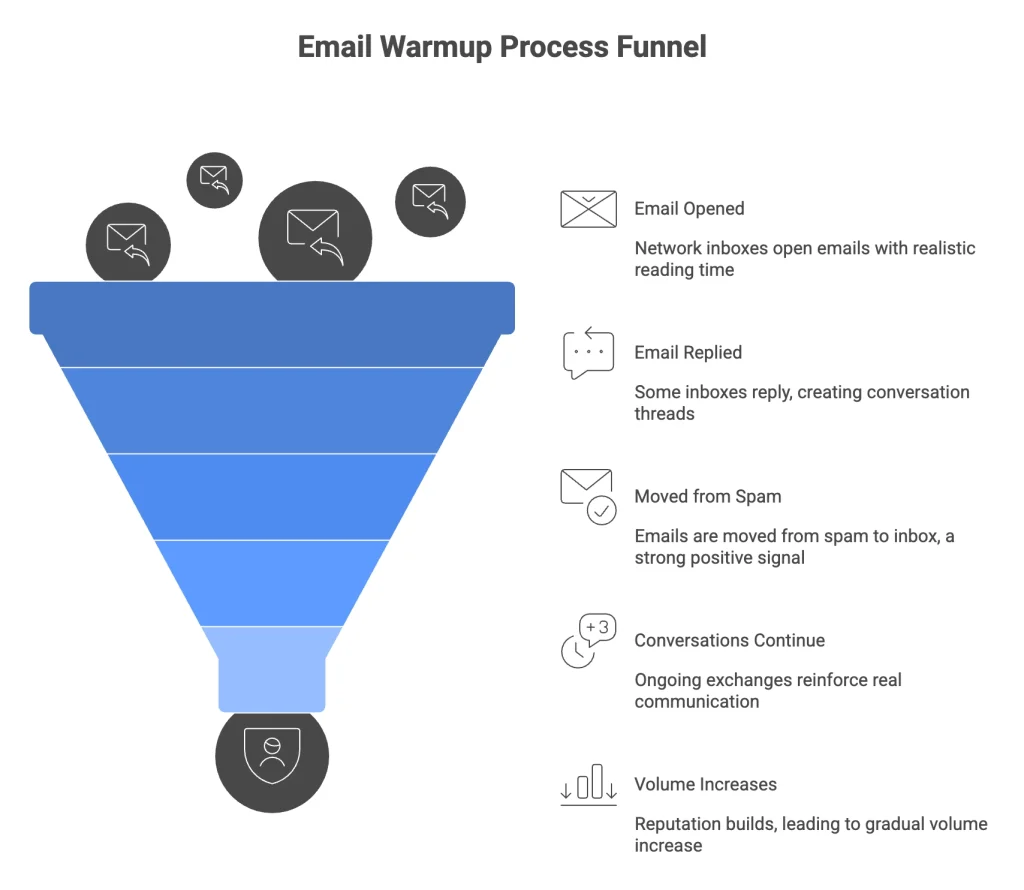
Here’s what a typical warmup cycle looks like step by step:
- The warmup tool sends an email from your connected mailbox to inboxes in the warmup network, at a volume matched to your current reputation stage.
- Network inboxes open the email with a realistic reading time before any further action.
- Some inboxes reply, generating genuine back-and-forth conversation threads with natural delays between responses.
- Some inboxes move the email from spam to inbox — one of the strongest positive signals a sender can generate.
- Conversations continue over multiple exchanges, reinforcing that your domain is involved in real, ongoing communication.
- Volume increases gradually as reputation builds, following a ramp based on placement signals rather than a fixed calendar.
Advanced tools go further with AI behavior modeling. Instead of just opening emails, the system mimics how a person actually reads: scroll speed, time spent on different sections, delays before replying, and varied message length. These details matter because mailbox providers have gotten very good at detecting engagement patterns that look too clean or too consistent.
After two to four weeks of this running in the background, your domain has a legitimate engagement history. Mailbox providers see a sender that receives replies, holds conversations, and isn’t generating complaints. That’s a trusted sender profile — and it’s what makes cold outreach actually land.
E-Warmup runs on 40,000+ real inboxes, using AI read emulation and natural conversation simulation to generate engagement that mailbox providers treat as genuine. Setup takes 25 seconds. Warmup starts immediately, with no configuration required.
Manual Email Warmup vs Automatic Email Warmup
Manual warmup is exactly what it sounds like. You send emails between a handful of accounts you control, open them, reply to them, and move a few out of spam. It costs nothing. It also doesn’t really work, at least not at any meaningful scale.
The numbers tell the story. According to HowToWarmUpEmail’s analysis, manual warmup can achieve up to 93% inbox placement — but only slowly, over 60+ days, requiring 30 to 60 minutes of daily hands-on effort. Automated warmup reaches 91% placement in two to three weeks with zero daily management. For most professional senders, the timeline difference alone settles the question.
There’s also the consistency issue. Manual warmup relies on someone remembering to do it every day, at the right volumes, without skipping days or making sudden changes. The moment it becomes irregular, the signals it was generating become inconsistent — and inconsistent signals are almost worse than no warmup at all.
| Criteria | Manual Warmup | Automated Warmup |
| Inbox placement | Up to 93% (over 60+ days) | ~91% (in 2 to 3 weeks) |
| Network size | 3 to 5 inboxes | 40,000+ real inboxes |
| Daily time required | 30 to 60 minutes | None |
| Blacklist risk at 60 days | ~4.2% | Lower at scale |
| Scalability | None | Scales with outreach |
Source: HowToWarmUpEmail
The cost of poor inbox placement over a full campaign cycle — lost pipeline, domain recovery time, rebuilding a burned domain — makes the tool investment look straightforward by comparison.
Related: Automatic Email Warm Up vs Manual Warmup: What Actually Works? A real comparison of both approaches, including signal quality analysis, and which method suits different sender types.
How Long Should You Warm Up Email?
Two to four weeks is the standard range, and for most senders, that’s accurate. But it’s the floor, not the ceiling. High-volume senders or anyone targeting enterprise accounts should plan for six to eight weeks before scaling aggressively.
The data backs this up. MailReach’s Email Deliverability Statistics show that 70% of senders who rush warmup see inbox placement rates below 80% in their first month of outreach. North American senders average 87.9% placement when warmup is done correctly. Global averages sit around 83%.
The timeline should be driven by data, not a calendar date. What you’re watching for is stable inbox placement across the providers your targets use, healthy reply rates from warmup conversations, and no spam filtering on warmup emails themselves.
| Week | What Should Be Happening |
| Week 1 | Low volume (10 to 20/day). Establishing baseline engagement signals. |
| Week 2 | Moderate ramp (20 to 40/day). Reply momentum building. |
| Week 3 | Higher activity (40 to 80/day). Inbox placement stabilizing. |
| Week 4 | Stable pattern (80 to 100+/day). Ready to layer in real outreach carefully. |
One thing that trips up a lot of teams: they hit week four, everything looks good, and they turn the warmup off. That’s the wrong move. Cold outreach generates neutral signals at best — low open rates, no replies, occasional spam reports. Running a warmup alongside campaigns counterbalances those signals, keeping positive engagement flowing while real outreach is live.
Turn warmup off, and the reputation that took a month to build starts degrading within days.
Warning: Stopping warmup the moment campaigns start is one of the most common deliverability mistakes. Treat it as an ongoing system, not a pre-launch checkbox.The Problem with Basic Email Warmup Tools
Not every warmup tool is built the same, and some actively cause the problem they’re supposed to solve. Teams assume that using any warmup tool is better than using none. That’s not always true.
Basic warmup tools use bot inboxes, static seed lists, and canned reply templates that never change. The same accounts interact with every domain in the tool’s network, using the same reply patterns at the same time. Mailbox providers have seen this countless times — they’ve catalogued the IP ranges, account patterns, and interaction signatures of every major low-quality warmup network.
When those patterns appear, one of two things happens. Either the warmup signals get discounted entirely. Or the pattern itself becomes a negative signal, because legitimate senders don’t interact exclusively with a fixed set of accounts. Either way, the warmup is working against you.
The tools that actually work are built on real inbox networks with genuine behavioral variation. Not because it’s harder to build, but because it’s the only approach that produces signals mailbox providers actually trust.
What to Look for in an Email Warmup Tool
Real inbox network at scale
Size and authenticity both matter, and they compound each other. Ten thousand real inboxes produce fundamentally different engagement patterns than five hundred bot accounts — not just because of volume, but because real inboxes introduce genuine variation in behavior and interaction patterns that make engagement look organic. Look for networks in the tens of thousands.
AI behavior simulation
Human reading behavior is complex and inconsistent in exactly the ways that make it look human. Good warmup tools simulate realistic reading speed, reply timing, varied message interaction, and conversation continuation. If a tool opens every email within five seconds and replies within two minutes every single time, that’s a pattern. Patterns get flagged.
Inbox placement monitoring
Running a warmup without visibility is guesswork. The best tools include live diagnostics: DNS health checks, spam score tracking, and placement tests showing exactly where your emails land across major providers throughout the process. You shouldn’t have to wait until a campaign underperforms to find out something went wrong.
Multi-provider compatibility
Your tool should work across Gmail, Outlook, SMTP-based providers, SendGrid, and Amazon SES without workarounds. Limited provider support is a signal that the tool wasn’t built for professional use. If you’re running outreach across multiple domains or different sending infrastructures, this matters even more.
Automated volume ramp
Sending volume should increase based on real engagement data, not a fixed schedule. Tools that adjust ramp speed based on actual inbox placement signals are significantly more reliable than those running on a preset calendar. A timer shouldn’t hold back a domain building reputation faster than average.
How E-Warmup’s AI Email Warmup Works
E-Warmup is built on a network of 40,000+ real inboxes. Not bots, not seed accounts — real mailboxes that generate authentic engagement signals across providers. The AI read emulation system mimics human reading patterns, reply timing, and conversation behavior at a level that looks genuinely organic to mailbox providers.
Setup takes 25 seconds. Connect your mailbox, and warmup starts immediately. It supports Gmail, Outlook, SMTP, SendGrid, and Amazon SES. Warmup conversations run in 30+ languages, which matters for senders targeting international markets where English-only warmup networks can create mismatched signals.
The system keeps running after your campaigns start. Outreach generates flat or negative engagement signals. Warmup running in parallel keeps the positive signals flowing, protecting inbox placement as volume scales.
E-Warmup at a glance: 40,000+ real inboxes | 98% inbox placement rate | 25-second setup | 30+ languages | Gmail, Outlook, SMTP, SendGrid, Amazon SES
Learn All Features of E-Warmup
Email Warmup Best Practices Before Scaling Outreach
Before moving from warmup to live campaigns, run through this checklist. Every item here has caused a deliverability failure when skipped.
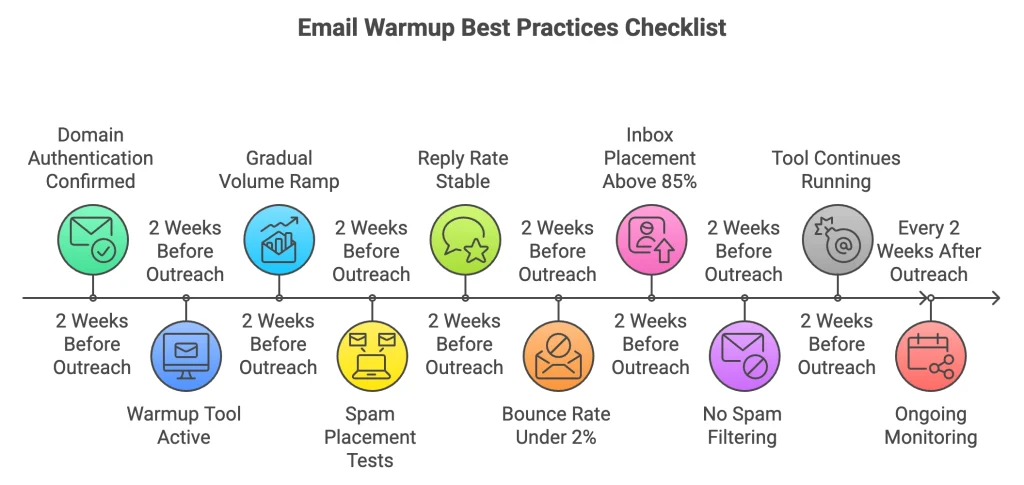
- ✅ Domain authentication confirmed — SPF, DKIM, and DMARC all passing
- ✅ Warmup tool active for at least 2 full weeks before any outreach
- ✅ Daily sending volume ramped gradually, no sudden spikes
- ✅ Spam placement tests run across Gmail, Outlook, and other target providers
- ✅ Warmup reply rate stable and healthy over multiple consecutive days
- ✅ Bounce rate under 2% on any test sends (per Mailtrap’s deliverability benchmarks)
- ✅ Inbox placement rate stable above 85% (per The Digital Bloom’s 2025 benchmarks)
- ✅ No spam filtering on warmup emails in the past several days
- ✅ Warmup tool confirmed to continue running once outreach begins
The checklist isn’t just a pre-launch ritual. It’s an ongoing monitoring habit. Run placement tests every two weeks once campaigns are live. Problems caught early are fixable. Problems caught after three weeks of damaged sending are not.
Common Email Warmup Mistakes That Hurt Deliverability
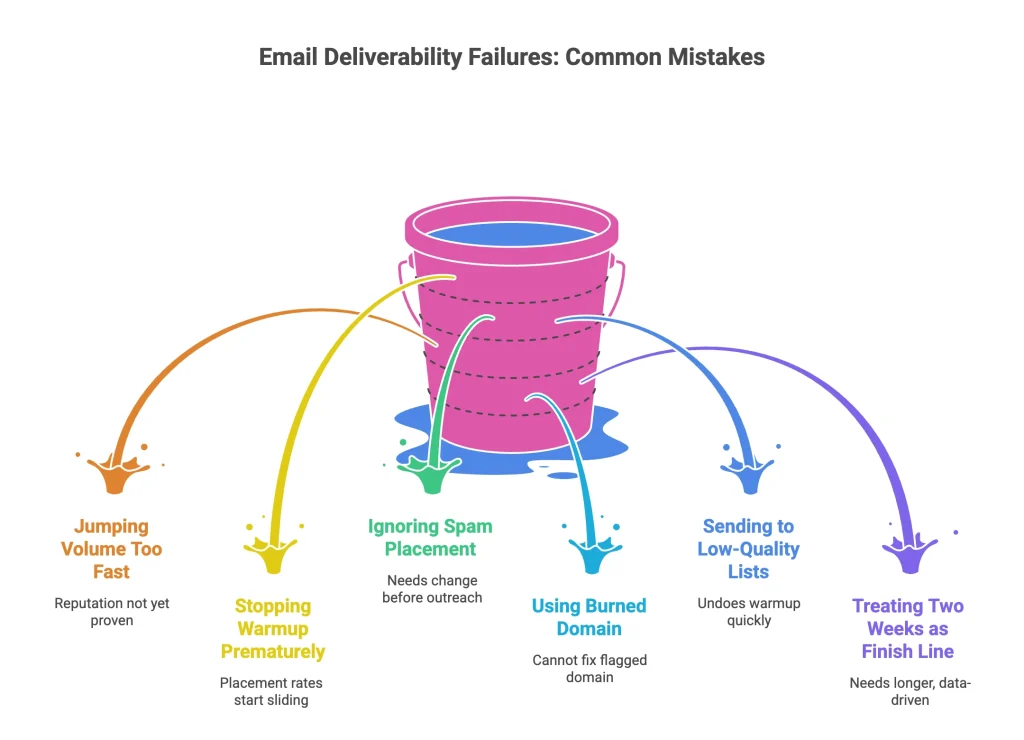
Most deliverability failures aren’t random. They come from the same mistakes, made by senders who didn’t know what they were getting wrong until it was too late.
1. Jumping volume too fast. Reputation doesn’t care how good your copy is. Send too many emails too quickly, and spam filters activate before the domain has a chance to prove itself. The jump from warmup volume to campaign volume should be gradual, not a single overnight switch.
2. Stopping warmup before campaigns end. Warmup isn’t a pre-launch step. It’s an ongoing system. Turn it off mid-campaign, and placement rates start sliding within days.
3. Ignoring spam placement signals. If warmup emails are landing in spam, something needs to change before any real outreach begins. Check placement actively, not just delivery rates. Delivered doesn’t mean inboxed.
4. Using a shared or previously burned domain. Warmup builds reputation. It can’t fix a domain that’s already been flagged. Start fresh with a clean domain. Trying to warm up a burned domain is like painting over rust.
5. Sending to low-quality lists. High bounce rates and spam complaints will undo weeks of warm-up faster than most people expect. List hygiene matters as much as warmup. Clean the list before the first send, not after the damage is done.
6. Treating two weeks as the finish line. Two weeks is the minimum for average sending volumes. Some senders need four to six weeks. Let the data decide, not the calendar.
Can You Actually Skip Email Warmup?
You can. Nothing stops you from skipping it. But the outcome is predictable. GrowLeads’ domain blacklist recovery guide puts inbox placement for cold-launched new domains below 30%, with blacklisting risk spiking significantly in the first 30 days of unwarmed sending.
The senders who ask this question usually have a deadline. The warmup timeline feels like a delay they can’t afford. But campaigns that skip warmup and launch at full volume consistently produce worse results than a delayed launch with proper preparation.
For any serious outbound operation — sales, recruiting, agency campaigns, SaaS outreach — an email warmup tool is the foundation. Skip it, and you’re building on sand.
Frequently Asked Questions
Conclusion
Don’t let a new domain kill campaigns you haven’t even launched yet. Every day you send without a warmed domain is a day your emails are fighting to reach inboxes they should already have access to.
An email warmup tool fixes that — automatically, from day one. No manual effort, no guesswork, no watching open rates crater and wondering what went wrong.
