
You just sent 10,000 emails, and the dashboard shows a beautiful 98% delivery rate. No bounces, no red flags, just green checkmarks across the board. But two hours later, your open rate is stuck at a measly 2%.
Here is the thing: your platform is telling you a half-truth. “Delivered” simply means the recipient’s server didn’t reject the file at the front gate. It doesn’t mean the email actually made it into the inbox.
What happens next is where most campaigns die. Once the server accepts the mail, it runs a second check to decide if that message belongs in the primary folder or the junk pile. That’s the gap an email spam test is built to close.
You’re about to learn exactly how to bridge the distance between reaching a server and reaching a human. We’ll look at the technical triggers that hide your mail and how to fix them before you hit send.
What Is an Email Spam Test?
An email spam test is a pre-send diagnostic that evaluates whether your email will be filtered as spam. It essentially acts as a dry run for your campaign. You send your draft to a controlled environment, and the tool tells you how the world’s biggest filters will react to it.
Most people think sending a test email to their own Gmail account is enough. That is a mistake because your personal history with your own domain is biased. Filters already know you, so they let your mail through.
A real inbox placement test uses seed addresses that have no prior history with you. This gives you an objective look at how a cold recipient’s filter views your brand. It checks your authentication, scans your links, and looks for blacklists.
Think of it as a dress rehearsal. If you’re going to fail, you want to fail in a test environment where it doesn’t hurt your reputation. Doing this takes maybe ten minutes, but skipping it can ruin your domain for months.
The Delivered vs. Inbox Placement Myth
Delivery rate is a technical metric, not a marketing one. When a mail server sends a 250 OK response, your ESP marks it as delivered. But that server could immediately shove your email into a dark corner of the spam folder.
Spam folder placement is still a delivery. The “letter” reached the “house,” but it was thrown straight into the trash can in the garage. Your report won’t show you that unless you’re looking at placement data.
According to the Validity 2025 Email Deliverability Benchmark Report, nearly 16% of all marketing emails never reach the inbox. That is a massive chunk of your list that literally never sees your offer.
Imagine paying for 100,000 subscribers, but only 84,000 ever getting the chance to open your mail. That’s the reality for most senders who rely on basic delivery stats. You’re losing money on people who aren’t even seeing your name.
Decoding the SMTP Response Code Trap
When your email reaches a server, the interaction is governed by SMTP codes. A code starting with 2, like 250 OK, means success. But these codes can be deceptive for marketers who don’t know the back-end logic.
ISPs often use “throttling” to slow down senders they don’t fully trust yet. You might see a 421 error, which tells your server to try again later. If your ESP doesn’t handle these retries correctly, your delivery rate drops instantly.
Then there are 550 errors. These are permanent rejections. If a filter decides your content is dangerous, it might issue a 550 5.7.1 code, which translates to “Access Denied.”
Relying on a dashboard that just says “Delivered” hides these nuances. A professional email health checker looks at these raw server responses to find out if the ISP is actually pushing your mail into a black hole.
How Spam Filters Decide Where Emails Go
Modern spam filtering doesn’t care about “Free” or “Act Now” as much as it used to. Today, it is all about your digital identity and how people treat your mail. The filters at Gmail and Outlook are smarter than ever.
First, they look for your “passport.” This means SPF, DKIM, and DMARC. If these aren’t aligned, you’re viewed as a potential phisher. Google made these mandatory for bulk senders in early 2024, and they aren’t kidding about it.
Next comes your domain reputation. This is basically a credit score for your URL. If you have a history of sending mail that people actually open and reply to, your score goes up. If they ignore you, it tanks.
Then there is the sender score of your IP address. If you’re on a shared IP with a bunch of low-quality senders, their bad habits can drag you down. It’s like living in a bad neighborhood; the cops are more likely to pull you over.
Finally, they look at engagement. Do people move your mail from “Promotions” to “Primary”? Do they reply? Those are the gold-standard signals. An email warmup tool focuses on these signals to prove to filters that you are a “good” sender.
Comparison: Gmail vs. Outlook Filtering Behavior
Each provider uses different logic to determine if your mail is trustworthy. This table helps you understand the specific technical focuses of the two largest ISPs.
| Filtering Factor | Gmail (Consumer) | Outlook / Office 365 (Corporate) |
| Primary Trust Signal | Domain Reputation & Engagement | IP Reputation & Security Lists |
| Spam Folder Trigger | Low open rates and “Delete” signals | Blacklisted links or bad DNS records |
| Placement Sensitivity | Extremely high on “Promotions” tab | Aggressive Junk placement for new IPs |
| Authentication Requirement | Mandatory SPF/DKIM/DMARC | Strict SPF and IP “Greylisting” |
The Psychology of Gmail vs. Outlook Filters
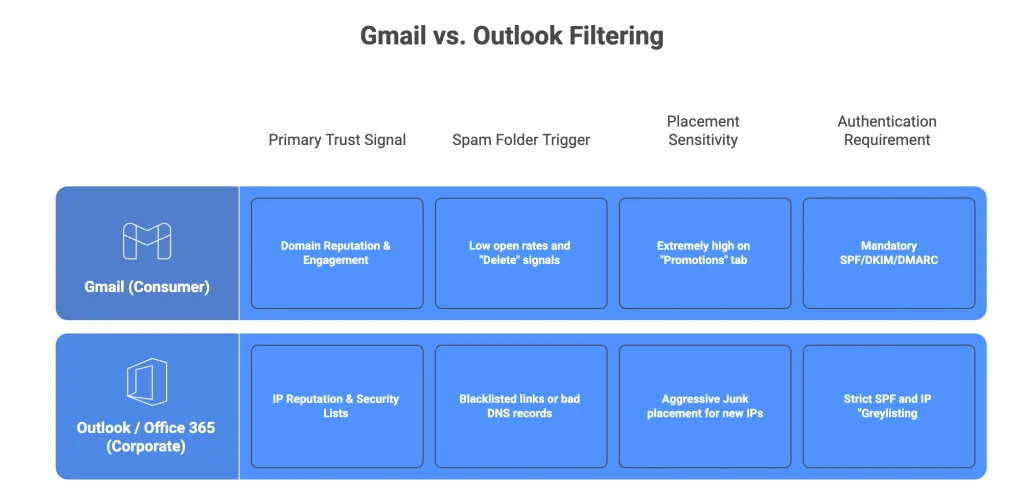
Gmail uses a heavy machine-learning feedback loop. It learns from user behavior in real time. If a thousand people delete your email without opening it, Gmail assumes your mail is unwanted and starts junking it for everyone.
Outlook and Office 365 are different. They rely more on “Greylisting” and strict security blacklists. If your IP address has ever been associated with a high volume of bounces, Microsoft filters will block you before you can even say hello.
Corporate filters like Mimecast or Proofpoint are even more aggressive. They look for “out of character” sending patterns. If you usually send 100 emails a day and suddenly send 10,000, these filters will quarantine your mail for review.
Understanding these differences is why you need targeted email deliverability monitoring. You can’t use the same strategy for a B2B list that you use for a Gmail-heavy list. Each provider requires a different trust-building approach.
How to Run an Email Spam Test
You should never send a high-stakes campaign without a spam filtering check. The process is straightforward, but you have to be meticulous about it. Here is how to do it correctly.
Start by creating your final version. Don’t use “test” in the subject line. Don’t use placeholder text. Every link must be live and every tracking pixel must be active. Filters analyze the whole package.
Send this version to your testing tool’s seed list. These are real accounts at Gmail, Yahoo, Outlook, and various corporate filters. Wait for the report to generate, which usually takes about five to ten minutes.
Find out if your Email lands in Spam (FREE TOOL)
Use our Free Email Template Spam Checker Tool
Look at the inbox placement rate by provider. If you’re hitting the inbox at Gmail but landing in junk at Outlook, you have a specific reputation problem with Microsoft. That’s a clear signal you need more warm-up on that platform.
Check your email health checker scores for things like HTML weight and broken links. If your email is over 102KB, Gmail will clip it, which often hides your unsubscribe link and triggers spam complaints.
Pre-Send Deliverability Checklist
- Verify SPF, DKIM, and DMARC records are “Pass” and “Aligned.”
- Check that your email file size is under 102KB to avoid clipping.
- Scan all links to ensure none are on a blacklist or use public shorteners.
- Test your “From” name and address for consistency with your domain.
- Review your domain reputation in Google Postmaster Tools.
- Ensure you have a one-click unsubscribe header active for Gmail/Yahoo compliance.
The Danger of Spam Traps and How to Avoid Them
Spam traps are the landmines of the email world. These are email addresses that don’t belong to real people. They exist solely to catch senders who use poor list-building habits or bought lists.
ISPs create pristine traps and never used for signups. If you hit one, it means you scraped the address or bought it. This is a one-way ticket to a permanent domain block. ISPs have zero tolerance for this.
Recycled traps are old, abandoned email addresses. If you haven’t cleaned your list in two years, you’re likely hitting these. While less severe than pristine traps, they still signal to filters that your list hygiene is a mess.
Regularly using an email deliverability tool to verify your list is the only way to stay safe. If you don’t remove inactive users, you’re eventually going to hit a recycled trap that will sink your sender score.
What to Do If Your Emails Are Going to Spam
If your email spam test results are ugly, don’t panic, but definitely stop sending. You need an email deliverability tool that doesn’t just find problems but helps you fix them. Most issues stem from a weak or damaged reputation.
Follow this methodical order of operations to recover your domain health:
- Audit Your Authentication Alignment: Check that your SPF and DKIM records are not only passing but correctly “aligned” with your “From” domain. You can verify your setup using Google’s Email Sender Guidelines to ensure you meet the latest standards.
- Review Google Postmaster Tools: Log into Google Postmaster Tools to see your domain’s specific health rating. If your reputation is in the “Low” or “Bad” category, Gmail will automatically filter your mail regardless of your content.
- Run a Blacklist Audit: Use an email deliverability tool to scan your sending IP and domain against major databases. If you are listed, you must follow the specific delisting procedures before sending another campaign to prevent further reputation damage.
- Execute a List Hygiene Scrub: Remove any “hard bounce” addresses and subscribers who haven’t opened an email in over 90 days. High bounce rates and low engagement are the two fastest ways to tank your sender score.
- Deploy an Email Warmup Tool: Use a platform like E-Warmup to generate positive engagement signals across a network of 40,000 real inboxes. These accounts will open, reply to, and move your emails from spam to the primary inbox, “teaching” filters that your mail is wanted.
Instantly Alternatives: What Instantly, Smartlead, and Woodpecker’s Built-In Warmup Actually Does

Sending History 101: How Inbox Providers Judge Your Email Domain Reputation
Click Rate vs Click Through Rate: Why the Same Campaign Shows Two Different Numbers
You can use the email deliverability monitoring dashboard to watch your reputation climb in real-time. It’s a lot easier to fix a problem when you have a direct line of sight into how the big providers see you.
For a deeper look at the specific software features and infrastructure required to maintain a perfect reputation, see our pillar guide: Email Deliverability Tool: The Complete Guide to Reaching the Inbox in 2026.
Rebuilding trust takes time, but it is much faster than starting over with a new domain. By focusing on authentic interaction and technical precision, you can pull your domain out of the junk folder and ensure your next campaign reaches the people who matter.
Why Engagement Signals are the New SEO for Email
In the past, you could “hack” the inbox with the right keywords. That era is over. Today, ISPs care about how many people “star” your email or move it to a specific folder. These are high-intent signals.
When a user replies to your marketing email, it tells Gmail that you’re a human, not a bot. This is why many smart marketers now include questions in their campaigns. They want that reply to boost their domain reputation.
If people are marking your mail as “Not Spam,” you’re winning. This is the single fastest way to improve inbox placement. It’s a manual process for real users, but it’s something E-Warmup does automatically for you.
Filters also look at “Delete without opening” rates. If your subject lines are clickbait but your content is garbage, your reputation will suffer. The machine knows when you’re tricking people into opening a message they don’t want.
Advanced Infrastructure: BIMI and Beyond
If you want to stay ahead in 2026, you need to look at BIMI (Brand Indicators for Message Identification). This allows your brand logo to appear right next to your email in the inbox. It is a massive trust signal.
BIMI isn’t just about branding. To get it, you must have a strict DMARC policy of p=quarantine or p=reject. This proves to the world that you’ve secured your domain against spoofing.
Users are more likely to open an email with a verified logo. This increased open rate creates a positive feedback loop for your sender score. It’s a technical hurdle, but the payoff for your deliverability is huge.
An email spam test will often flag if you’re eligible for BIMI or if your DMARC policy is too weak to support it. Think of it as the ultimate badge of honor for a professional sender.
How Often Should You Run Email Spam Tests?
You’re probably wondering if you need to do this every time. The short answer is yes. But there are specific moments where an email health checker is absolutely mandatory for your business health.
Run a test before every major campaign or product launch. If you’re sending to your whole list, the stakes are too high to guess. One bad blast can sink your domain reputation for the next month.
Do it whenever you change your email template or ESP. New code or a new sending IP can trigger filters that were previously dormant. Even a small change in your HTML structure can flip a “safe” email to “spam.”
You should also test when you see a sudden dip in open rates. Don’t wait for it to hit zero. A 5% drop is often the first sign of a spam folder placement issue that is just starting to spread.
Consistent email deliverability monitoring is the only way to stay ahead of the algorithms. They change their rules every week. If you aren’t testing, you’re just hoping, and hope isn’t a deliverability strategy.
Frequently Asked Questions
Reach the Inbox with E-Warmup
Stop guessing where your emails are landing. E-Warmup gives you a complete email deliverability tool that identifies placement issues and fixes them automatically. Our network of 40,000+ real inboxes generates the authentic engagement you need to stay out of the junk folder. You can set everything up in 25 seconds and start seeing your sender score improve today.
