Quick Answer
Sender reputation is the trust score inbox providers assign to your domain and IP, based on authentication, engagement, complaint rates, and blacklist status. Landing in spam once doesn’t kill it. Ignoring it does.
- Reputation is scored per domain and per IP, separately, by each major inbox provider
- A domain-level spam episode is usually recoverable in about 30 days with the right sequence
- Blacklist removal always requires fixing the root cause first, before submitting any request
- A real sender reputation score updates continuously, not once at signup
One bad campaign doesn’t mean your domain is done. What actually determines whether you recover is whether you diagnose the real cause, fix it in the right order, and rebuild sending history deliberately instead of just resuming at full volume.
What Is Sender Reputation and How Is It Scored?
Sender reputation is the trust score inbox providers assign to a sending domain and IP based on observed behavior over time. It’s not one single number. Gmail, Microsoft, and Yahoo each calculate their own version, using their own signals.
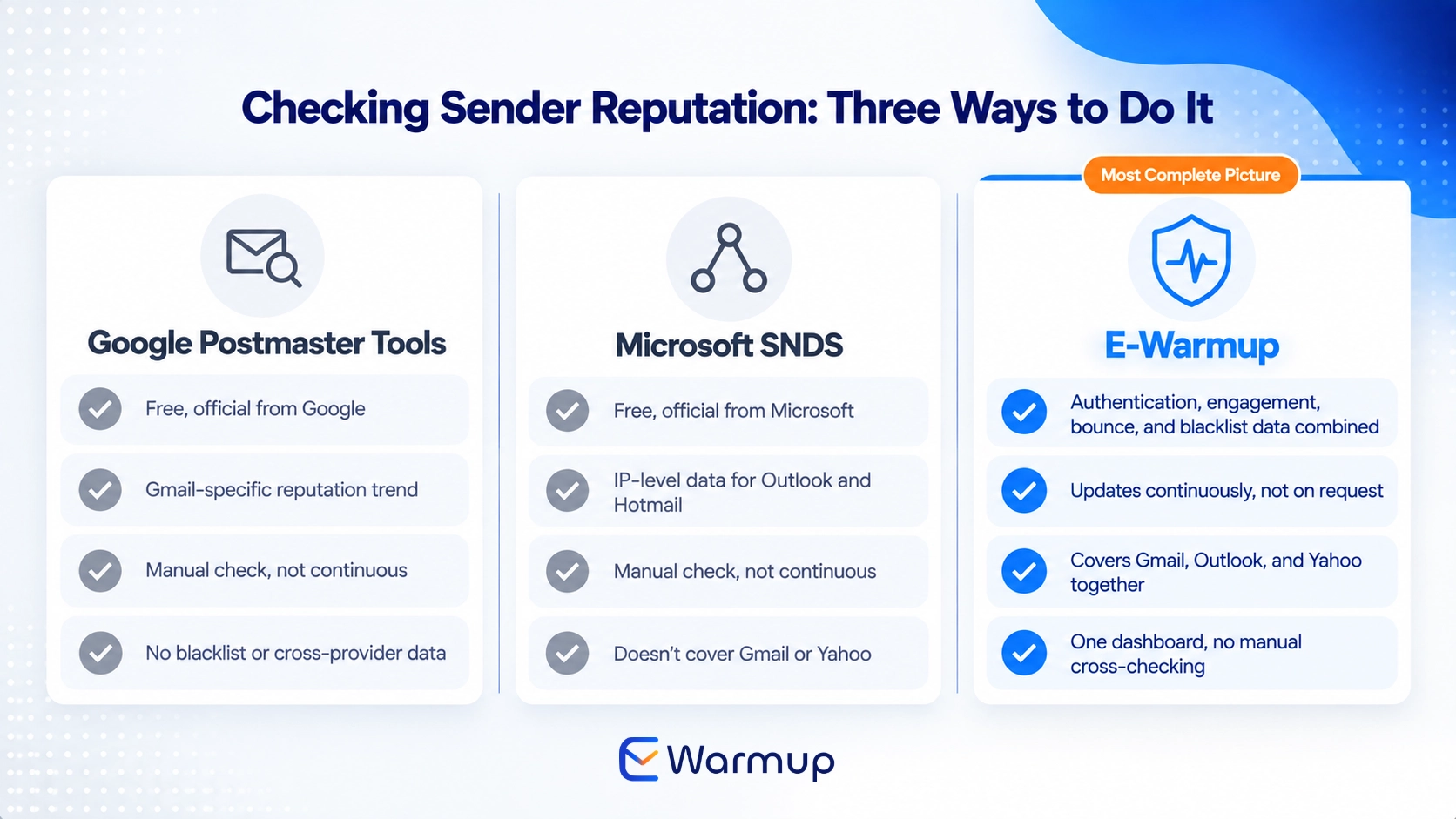
Google Postmaster Tools reports domain reputation directly from Gmail’s perspective, alongside spam rate and authentication status. Microsoft’s Smart Network Data Services (SNDS) works similarly but at the IP level rather than the domain level, tracking spam complaint percentage, spam trap hits, and filter results specifically for Outlook, Hotmail, and Live accounts.
This split matters. Domain reputation follows your sending domain everywhere. IP reputation is tied to the specific IP address sending the mail, which is why a shared IP can carry problems caused by a completely different sender using the same address.
A handful of factors feed both. Bounce rate, especially hard bounces to invalid addresses, signals poor list hygiene. Spam complaints are weighted heavily, since a single complaint tells providers a real recipient actively rejected your mail, not just that a message failed to deliver.
Engagement, opens, replies, and time spent reading, works in the opposite direction, signaling that real recipients want your mail. Sending volume and consistency round it out, since a sudden spike from a quiet domain reads as suspicious regardless of content quality.
How to Check Your Sender Reputation Score
A few free tools give a real read on where you stand right now. Google Postmaster Tools is the most direct source for Gmail specifically, showing domain reputation as a trend, not just a single snapshot.
MXToolbox offers a free blacklist and domain health check across dozens of blocklists simultaneously, useful as a first pass before digging into any single provider’s tools. It won’t show engagement data, but it catches blacklist listings fast.
E-Warmup’s dashboard runs this differently. Instead of a one-time check you have to remember to rerun, it pulls sender reputation continuously from authentication status, real engagement data, bounce trends, and blacklist monitoring, all in one place, updating as conditions actually change rather than sitting on the reading from your last manual check.
This is the same distinction covered in more depth in our breakdown of what a real reputation signal looks like versus a static number that never moves.
Related reading: Email Reputation Checker Says 100%? Why That Doesn’t Mean Your Campaigns Reach the Inbox covers exactly why most reputation checkers report something narrower than real inbox provider trust.
The 30-Day Sender Reputation Recovery Plan
Recovery works best as a sequence, not a single fix. Skipping ahead to volume before the underlying cause is actually resolved is the most common reason recovery stalls.
Week 1: Stop all campaigns. Diagnose the root cause. Pause active sending entirely. Check authentication status across SPF, DKIM, and DMARC, run a blacklist check, and review recent bounce and complaint data to identify what actually triggered the drop, rather than guessing.
Week 2: Fix authentication, clean the list, remove hard bounces. Correct any failing or misaligned authentication records first, since building reputation on broken authentication wastes the effort. Strip hard-bounced and long-unengaged addresses from your list before sending resumes.
Week 3: Re-warm the domain. This is where genuine engagement history gets rebuilt, real opens, real dwell time, a believable rate of replies, not a single clean send that resets nothing. E-Warmup’s AI Read Emulation, available on Growth tier and above, physically opens emails with varied timing rather than an instant automated flag, closer to how a real inbox actually behaves.
Week 4: Run an inbox placement test. Resume at low volume. Confirm actual placement across Gmail, Outlook, and Yahoo before scaling sending back up, then ramp gradually rather than jumping straight back to your prior volume.
Ongoing: Monitor daily. A domain that recovers once can slip again if authentication drifts or a new blacklist listing goes unnoticed. Continuous monitoring, not a one-time check, is what catches that early.
How to Remove a Blacklist Listing
The process starts with identifying exactly which blacklist flagged you, since Spamhaus alone runs several distinct lists, SBL, XBL, PBL, and DBL, each with a different removal path and different processing time.
The critical rule across every major blocklist, Spamhaus, Barracuda, and SURBL included, is the same: fix the underlying issue completely before requesting removal. Spamhaus explicitly states that removal requests should only go in once the abuse issue has been fully terminated, and a request submitted before the root cause is resolved typically gets rejected or reversed.
Processing time varies by list type. Spamhaus’s self-service PBL removals can clear within minutes to a few hours, while SBL removals requiring manual review commonly take one to three business days. Barracuda and SURBL run their own separate lookup and request processes, so a single domain issue can mean checking and clearing more than one list.
E-Warmup’s blacklist monitoring runs continuously rather than on request, covering domain-level blocklists, so a listing shows up as soon as it happens instead of days later when someone thinks to check manually. Faster detection means the fix starts sooner, which matters more than almost anything else in how long a recovery actually takes.
How to Prevent Sender Reputation Damage in the Future
A gradual volume ramp matters more than most senders expect, especially after a recovery. Jumping back to full sending volume the moment a blacklist clears looks the same to filtering systems as the original spike that likely caused the problem.
Ongoing engagement monitoring catches early warning signs before they become a full reputation hit. A slow decline in open rates or a rising complaint trend, caught early, is a much smaller fix than a domain that’s already landed on a blacklist.
Continuous warmup for active outreach domains, not a one-time setup step, keeps sending history fresh even during quieter weeks. This is the same principle covered in our breakdown of why bounce rate alone doesn’t tell you whether real reputation is actually improving.
E-Warmup’s Deliverability Agent, included on every plan including Free Forever, reads a mailbox’s sending and engagement data and flags issues like high bounce rates or failing DMARC, SPF, and DKIM records automatically, in plain language, before they compound into a bigger problem.
Sender Reputation FAQ
Does one email landing in spam ruin my sender reputation permanently?
No. A single incident is usually recoverable within a structured process, typically around 30 days. What causes lasting damage is continuing to send at normal volume without diagnosing or fixing the underlying cause.
What’s the difference between domain reputation and IP reputation?
Domain reputation follows your sending domain everywhere it sends from. IP reputation is tied to the specific sending IP, which matters most on shared infrastructure, since a different sender’s problems on the same IP can affect you even if your own sending is clean.
How long does blacklist removal actually take?
It depends on the list. Spamhaus’s self-service PBL removals can clear in minutes to hours, while SBL removals requiring manual review often take one to three business days. Every removal requires the underlying issue to be fully fixed first, or the request typically gets rejected.
Can I speed up sender reputation recovery?
Not by skipping steps. Diagnosing the actual cause before re-warming, cleaning the list before resuming volume, and ramping gradually instead of jumping back to full sending all matter more than any shortcut. Continuous monitoring afterward prevents a second incident from undoing the recovery.
Is Google Postmaster Tools enough to monitor sender reputation on its own?
It’s a strong, free source specifically for Gmail, but it won’t reflect how Outlook or Yahoo separately view your domain. A complete picture needs Microsoft SNDS for Outlook-specific data and blacklist monitoring across the lists that matter for your sending volume.
Does E-Warmup help with sender reputation recovery specifically?
Yes. E-Warmup combines continuous reputation monitoring with AI Read Emulation to rebuild genuine engagement history across 40,000+ real inboxes, plus continuous blacklist monitoring that catches new listings without a manual check. It’s available starting on the Free Forever plan, with a 14-day money-back guarantee on paid subscriptions if you decide to upgrade.
The Bottom Line
Landing in spam once doesn’t kill your domain. Ignoring it, resuming full volume without diagnosing the cause, or trusting a static score that never updates, does.
E-Warmup’s reputation monitoring and AI Read Emulation work together as the fastest realistic path to recovery, combining real-time scoring with genuine engagement across 40,000+ real inboxes to rebuild the trust signals inbox providers actually weigh.
Repair your sender reputation with E-Warmup. Start the 30-day recovery process today, free forever, with a 14-day money-back guarantee if you move to a paid plan.