
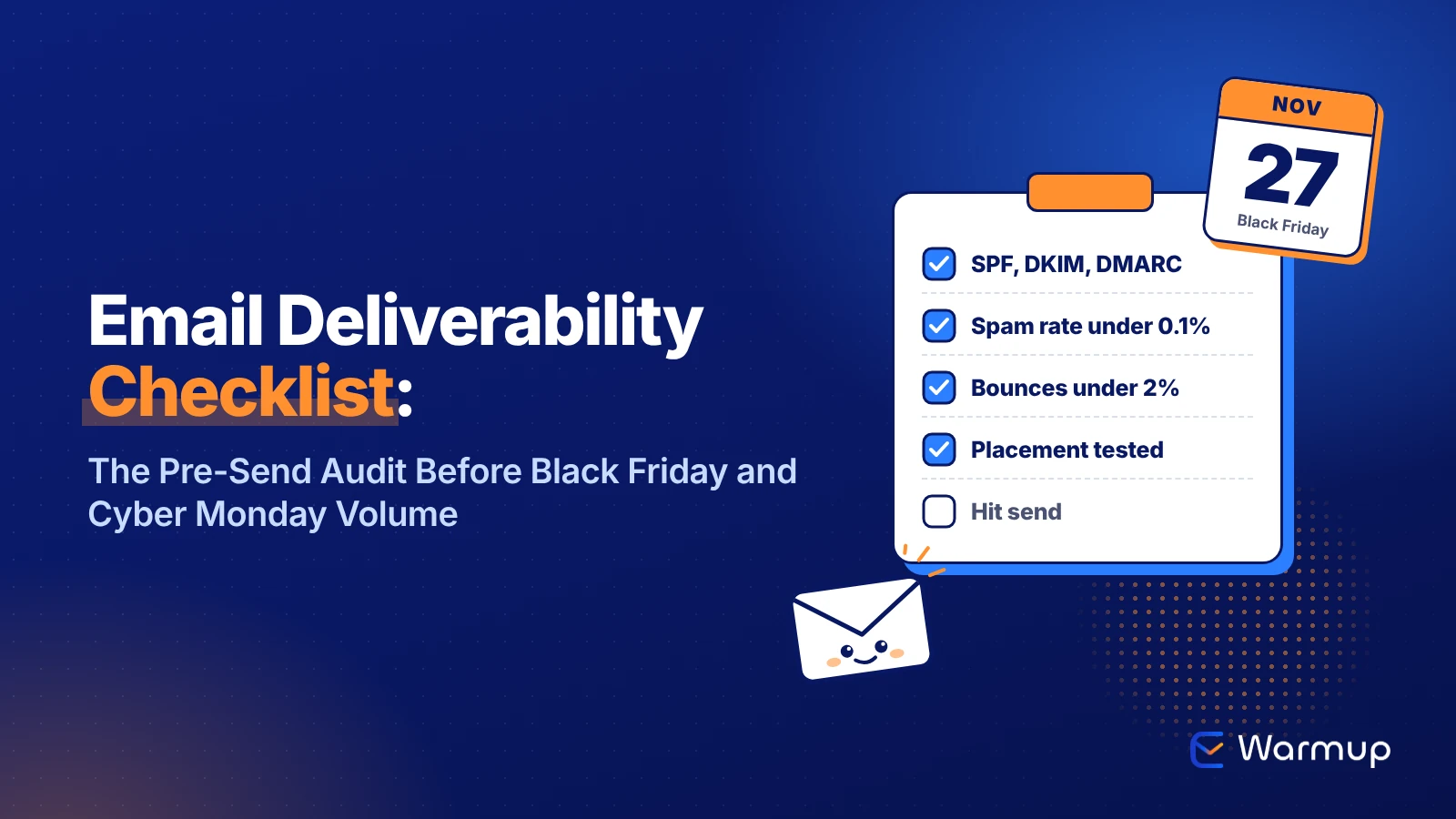
An email deliverability checklist is a pre-send audit of your authentication, sender reputation, list quality, inbox placement and content. Run it a week before Black Friday, because Microsoft now rejects unauthenticated bulk mail and Google wants spam rates under 0.1%. Fix what fails, then test placement before the big send.
Key Takeaways
- Bulk senders need SPF, DKIM and an aligned DMARC record at Gmail, Yahoo and Outlook, plus one-click unsubscribe at Gmail and Yahoo.
- Keep your Postmaster Tools spam rate under 0.1%. At 0.3% you’re out of bounds for Gmail and Yahoo.
- The average unknown-user bounce rate was 1.46% in 2025, per Validity. Stay under 2%.
- Validity puts global inbox placement at 87.2%, so roughly 1 in 8 emails misses the inbox.
- Make DNS changes early in the week and run your last placement test after the final template edit.
You’ve probably felt this one. The Black Friday campaign is designed, the discount code works, the countdown timer is ticking. Then Monday’s report shows opens about half of what you planned for.
Nothing broke that you could see. The emails got delivered. They just didn’t land in the inbox.
This email deliverability checklist is the list to run with one week left. Black Friday 2026 falls on November 27, and the volume is huge: Bird processed 6.5 billion emails on Black Friday 2025 alone, up 18.63% on the year before. And Validity found that rejection rates spiked during the 2025 holiday sales season.
So work through the 20 checks below before a single big campaign goes out.
The Email Deliverability Checklist at a Glance
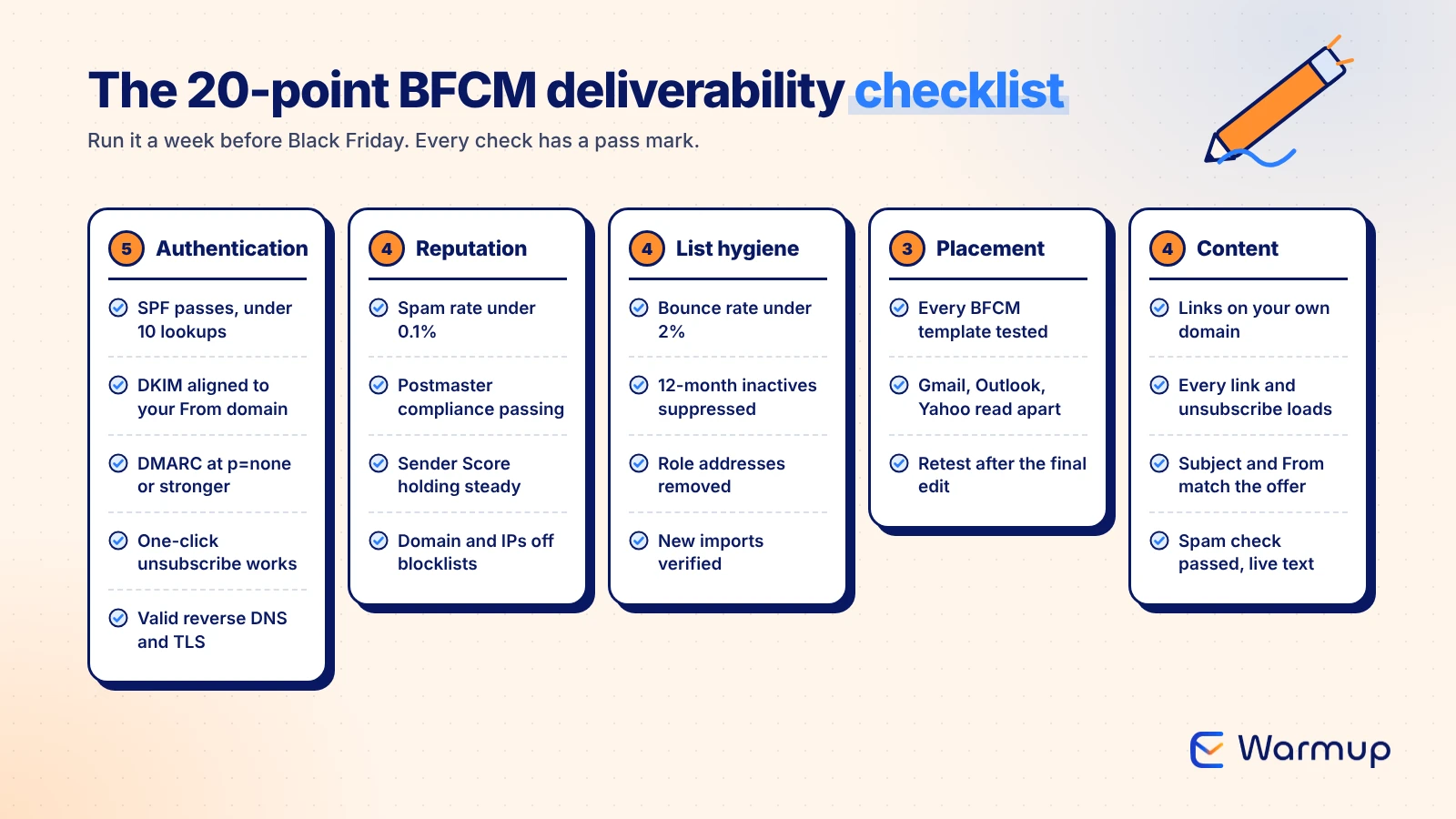
Here are all 20 checks in one table. If you only have an hour, start with authentication and list hygiene, since those cause the hard failures.
| Area | Check | Pass mark |
|---|---|---|
| Authentication | SPF record passes | Under 10 DNS lookups |
| Authentication | DKIM signs with your domain | Signature aligned to From domain |
| Authentication | DMARC published | p=none at minimum, aligned |
| Authentication | One-click unsubscribe header | Works in a test send |
| Authentication | Reverse DNS and TLS | Valid PTR, TLS on |
| Reputation | Postmaster Tools spam rate | Under 0.1% |
| Reputation | Postmaster compliance status | No failed requirements |
| Reputation | Sender Score (dedicated IP) | No sudden drop |
| Reputation | Blocklist check | Domain and IPs clean |
| List hygiene | Hard bounces removed | Under 2% bounce rate |
| List hygiene | Inactive contacts suppressed | No opens or clicks in 12 months |
| List hygiene | Role addresses removed | No info@, sales@, admin@ |
| List hygiene | New imports verified | Every address validated |
| Placement | Each BFCM template tested | From your real sending domain |
| Placement | Results split by provider | Gmail, Outlook, Yahoo checked |
| Placement | Retest after changes | Last test after final edit |
| Content | Links on your own domain | No public link shorteners |
| Content | Every link loads | Unsubscribe page too |
| Content | Subject and From match the offer | No fake “Re:” |
| Content | Template run through a spam checker | Live text, not one big image |
Authentication: SPF, DKIM, DMARC and One-Click Unsubscribe
Authentication is the first gate, and in 2026 it’s a hard one. If you send more than 5,000 emails a day, Gmail, Yahoo and Outlook all expect SPF and DKIM to pass, a DMARC record, and alignment between your From domain and at least one of them.
Microsoft was the last to enforce it. Its Outlook requirements for high-volume senders took effect on May 5, 2025, and Outlook now rejects failing mail with the 550 5.7.515 error. A spike to Black Friday volume is exactly when a weak setup gets caught.
Check these four records:
- SPF: your record must stay under the 10 DNS lookup limit in RFC 7208. Every tool you added this year (a new ESP, a help desk) may have pushed you over.
- DKIM: sign with your own domain, not only your ESP’s shared domain, so it aligns with your From address.
- DMARC: Yahoo’s sender requirements ask for a policy of at least p=none, and DMARC must pass.
- One-click unsubscribe: Gmail requires it for marketing mail from bulk senders, and Yahoo asks you to honor unsubscribes within 2 days.
If you run your own mail server, Google’s sender guidelines also require valid reverse DNS on your sending IPs and a TLS connection.
A week out is the right time for DNS edits. Making one on Thanksgiving gives you no time to retest. E-Warmup’s free SPF Record Generator and DMARC Record Generator help if you’re rebuilding either record, and our SPF record guide covers the lookup limit in more depth.
Reputation and Spam Rate: What Postmaster Tools Should Show
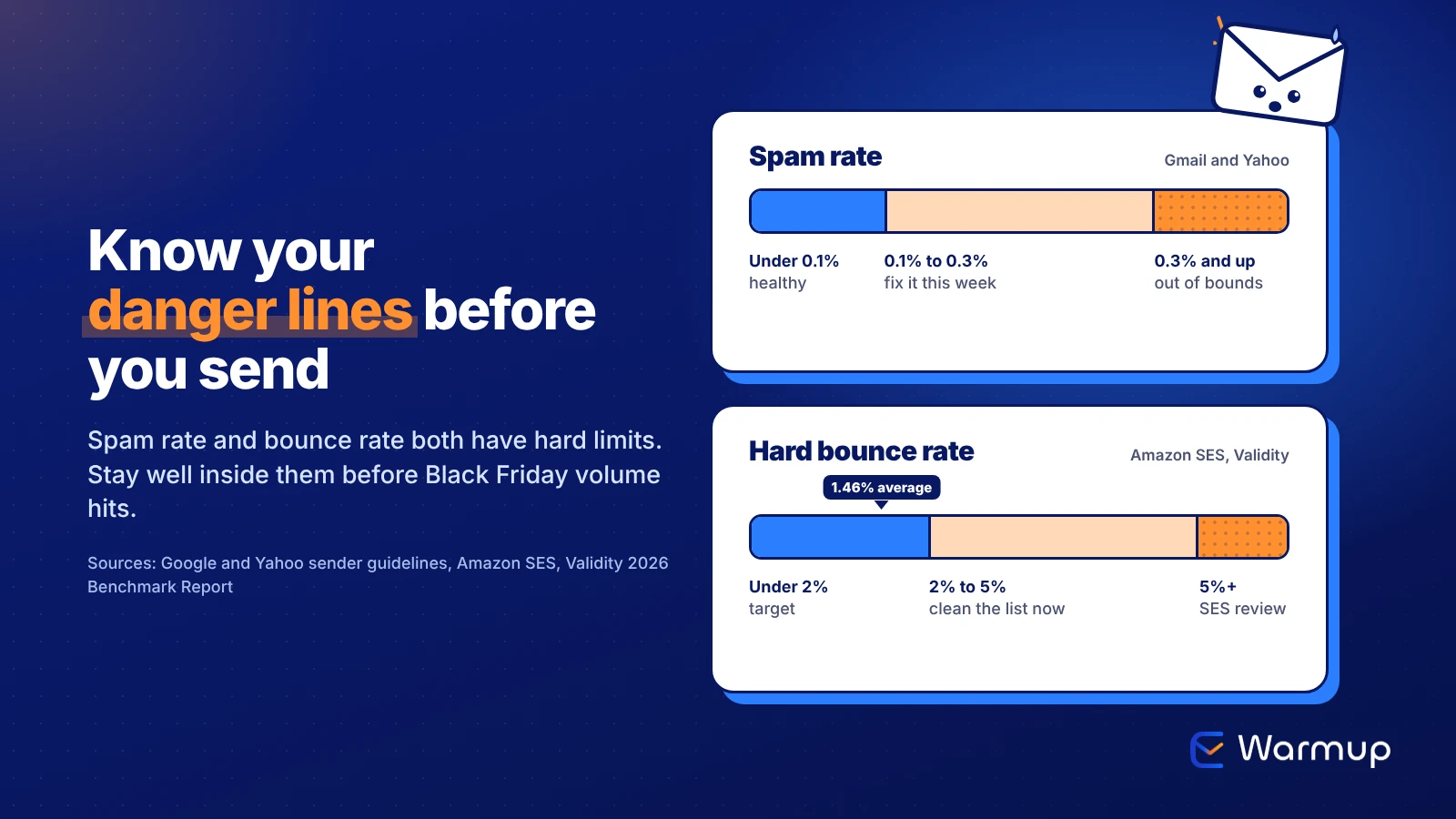
Spam rate is the one number Google puts a hard ceiling on. It asks senders to keep the spam rate in Postmaster Tools below 0.10% and to never reach 0.30%. Yahoo sets the same 0.3% ceiling.
Open Google Postmaster Tools and check two dashboards. The Spam rate dashboard should sit well under 0.1% for the last 30 days.
The Compliance status dashboard shows whether Google sees you meeting its sender requirements, so fix any failed item this week. If the new interface is still unfamiliar, our Postmaster Tools V2 walkthrough explains each verdict.
Two more reputation checks matter before BFCM:
- Sender Score: if you send from a dedicated IP, look it up on Validity’s Sender Score. The trend matters more than the number, so a sharp drop this month needs a cause.
- Blocklists: check your domain and sending IPs. A listing on Black Friday morning is far harder to fix than one found a week early. [INTERNAL LINK: Email Blacklist Check Pillar, Oct 23]
The thresholds in one place:
| Metric | Healthy | Danger line | Source |
|---|---|---|---|
| Gmail spam rate | Under 0.10% | 0.30% | |
| Yahoo spam rate | Under 0.3% | 0.3% | Yahoo |
| Hard bounce rate | Under 2% | 5% (account review) | Amazon SES |
| Average unknown-user rate | 1.46% | Benchmark only | Validity, 2025 |
E-Warmup’s reputation monitoring tracks these signals per mailbox, and its Deliverability Agent flags high bounce rates and failed SPF, DKIM or DMARC records in plain English, on every plan including Free Forever.
List Hygiene: Bounces, Inactive Segments and Role Addresses
Black Friday is when teams email everyone they’ve ever collected, and that’s how a clean sender suddenly bounces.
Old addresses are the main reason. The Validity 2026 Email Deliverability Benchmark Report notes that Yahoo closes accounts after 12 months of inactivity and Gmail after 24 months, so a list you haven’t mailed since last November is full of addresses that no longer exist. The same report puts the average unknown-user rate at 1.46% for 2025.
Aim to keep your email bounce rate under 2%. That’s the target Amazon SES recommends, and SES puts accounts under review at 5%. Google’s guidance says the same thing in plainer terms: automatically unsubscribe recipients who bounce more than once.
Before the campaign, do four things:
- Remove hard bounces from every send this year, including the old ones.
- Suppress inactive contacts with no opens or clicks in 12 months. Send them a separate, smaller win-back email instead.
- Remove role addresses like info@, sales@ and admin@. They reach shared inboxes, so nobody there opted in personally, and any of them can mark you as spam.
- Verify new imports from contests, events or partner lists before they get a BFCM email.
On volume, Google’s guidance is direct: increase sending volume slowly and start with your most engaged users. If your normal send is 20,000 and Black Friday is 150,000, ramp up this week with your best segments first.
If your campaigns go out through Klaviyo or Mailchimp, you can’t connect a mailbox to a warmup tool. That’s the gap Seed List Warmup fills: you add seed addresses to your regular list, and real inboxes open and engage with your campaigns.
Placement Test Before You Hit Send
An inbox placement test sends your actual email to seed inboxes at each provider and reports where it landed: inbox, spam, Promotions or missing. “Delivered” in your ESP only means the server accepted the email.
The gap is real. Validity’s benchmark puts 2025 inbox placement at 87.2% globally, with 6.6% going to spam and 6.1% going missing. By provider, Gmail placed 89.8%, Yahoo 87.3% and Microsoft 77.4%.
Test each BFCM template from the domain and ESP you’ll actually send with. Read the results by provider, because a template can pass at Gmail and land in Outlook’s junk folder. Then retest after any DNS change or template edit, since your last test should match the email you send.
E-Warmup runs placement tests across 40,000+ real inboxes, and the Free Forever plan includes 5 inbox placement tests a month. That covers a Black Friday email, a Cyber Monday email and a few retests. For what each result means, read our guide to inbox placement testing.
Content and Link Checks for Promo Emails
Content rarely sinks a healthy domain on its own, but promo emails stack the risk with big discounts, urgency and heavy images.
Start with links. Use your own domain for every link, because a public link shortener’s domain is shared with every other sender who uses it. Click every link in a test send, including the unsubscribe page, since a broken unsubscribe pushes people toward the spam button.
Then check the subject line and From name. Google’s guidelines say the subject, headers and display name should accurately represent the sender, and they tell senders not to fake “Re:” or “Fwd:”. Our cold email subject line guide covers the same rules with examples.
Last, keep live text in the email. A single image with no HTML text gives filters nothing to read and shows a blank box to anyone who blocks images. Run the final template through E-Warmup’s free Email Template Spam Checker to catch stacked spam words and missing personalization.
Your 7-Day Countdown to Black Friday
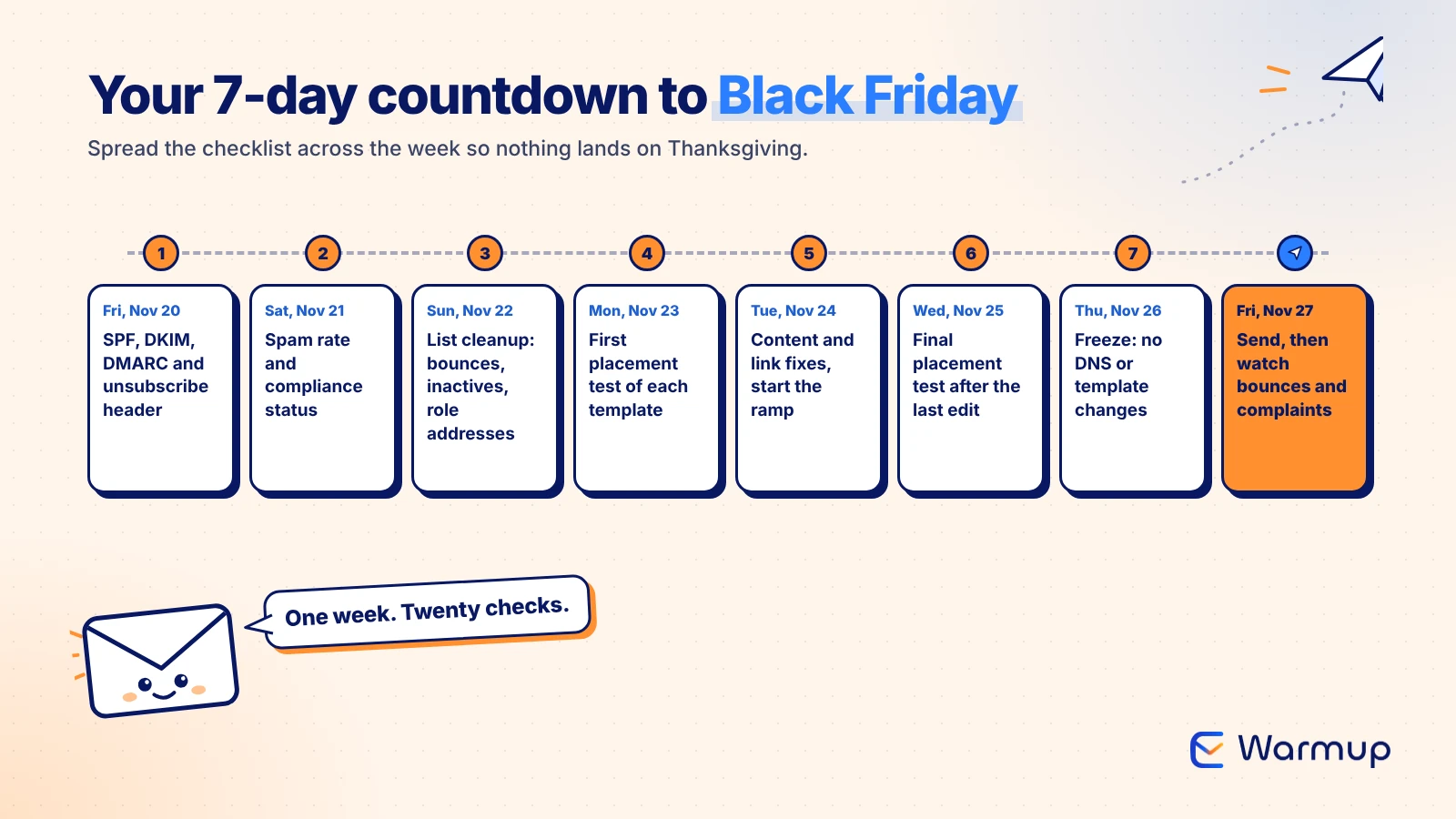
With Black Friday on November 27, here’s how to spread the checklist across the week so nothing lands on Thanksgiving.
| Day | Date | What to run |
|---|---|---|
| 1 | Fri, Nov 20 | Authentication: SPF, DKIM, DMARC, unsubscribe header |
| 2 | Sat, Nov 21 | Postmaster Tools spam rate and compliance status |
| 3 | Sun, Nov 22 | List cleanup: bounces, inactives, role addresses |
| 4 | Mon, Nov 23 | First placement test of each BFCM template |
| 5 | Tue, Nov 24 | Content and link fixes, start the volume ramp |
| 6 | Wed, Nov 25 | Final placement test after the last edit |
| 7 | Thu, Nov 26 | Freeze: no DNS or template changes |
| Send | Fri, Nov 27 | Watch bounces and complaints every few hours |
If you catch a problem on Black Friday itself, pause the send and fix it. Mailing the rest of a list into a rising complaint rate makes Cyber Monday on November 30 harder too. [INTERNAL LINK: Black Friday Email Deliverability, Oct 20]
FAQ
What should be on an email deliverability checklist?
An email deliverability checklist should cover authentication (SPF, DKIM, DMARC and one-click unsubscribe), sender reputation and spam rate, list hygiene, inbox placement testing, and content and link checks. Each item needs a pass mark you can verify, such as a spam rate under 0.1% or a bounce rate under 2%.
How often should I run an email deliverability audit?
Run a full email deliverability audit before any big volume change, such as Black Friday, a product launch or a new domain. Check spam rate and bounces weekly, since those move fastest. [INTERNAL LINK: Email Deliverability Audit, Dec 14]
What is a good email bounce rate?
Under 2% is the common target, and Amazon SES recommends staying below it. Validity reported an average unknown-user rate of 1.46% in 2025. If you go above 5%, SES places your account under review.
Do Microsoft and Outlook require DMARC?
Yes, for domains sending more than 5,000 emails a day. Since May 5, 2025, Outlook requires SPF and DKIM to pass plus a published DMARC record (p=none is accepted), aligned with your From domain. Failing messages get rejected with a 550 5.7.515 error.
How far ahead of Black Friday should I warm up a new domain?
Start at least 30 days ahead. E-Warmup’s warmup schedule uses 15 days of gradual volume increases followed by 15 days of randomized engagement. With only a week left, send Black Friday from your established domain instead of a new one.
Can an email deliverability tool replace this checklist?
A good email deliverability tool automates parts of it, like spam rate monitoring and placement tests. You still clean the list and review content yourself, since no tool knows which segments you plan to mail.
Run the Checklist, Then Check Placement, Free Forever
Most Black Friday deliverability problems are fixable on November 20 and expensive on November 27. Run the 20 checks, then test where your actual BFCM emails land before the big send.
E-Warmup puts inbox placement testing and reputation monitoring in one dashboard, so you can see authentication failures, bounce spikes and spam folder placement side by side. Start for free. No credit card required.
Related Reading
- Google Postmaster Tools V2: Reading the New Verdicts After V1 Retired: what each compliance and spam rate verdict means.
- Inbox Placement Test: The Ignored Metric That Decides Your Open Rate: why delivered and inboxed are different numbers.
- Email Deliverability Monitoring: How to Track Domain Reputation in Real Time: the weekly checks to keep running after BFCM.
Sources
- Bird, Black Friday by the Numbers (December 2025)
- Microsoft, Outlook’s New Requirements for High-Volume Senders (2025)
- Microsoft Support, Fix NDR error 550 5.7.515 in Outlook.com
- Google, Email sender guidelines
- Yahoo, Sender Best Practices
- IETF, RFC 7208: Sender Policy Framework
- Validity, 2026 Email Deliverability Benchmark Report
- Amazon SES, Enforcement FAQs
