
Most warmup advice says “warm up for a few weeks” without saying what that actually looks like day to day. That leaves people either guessing at volume or trusting a tool’s default settings without knowing whether those defaults fit their specific domain. This post lays out an actual email warmup schedule you can follow, day by day, instead of a vague timeline.
Here’s the schedule, broken into weekly phases, with the reasoning behind each stage so you can adjust it if your domain needs more or less time.
Why an Email Warmup Schedule Matters More Than a Warmup Feature
A lot of warmup tools run on autopilot. You flip a switch, and volume increases on a fixed timer regardless of how your specific domain is actually responding.
Volume without structure builds activity, not trust. Sending a large number of emails on a fixed schedule proves your account can send emails. It doesn’t prove inbox providers have started trusting the domain behind them.
A real warmup schedule forces gradual, believable sending behavior instead of a flat automated loop. The goal isn’t hitting a volume target by a specific date. It’s building a sending history that looks like it belongs to a legitimate, established sender.
That distinction matters more with modern filtering than it used to. Inbox providers increasingly weigh engagement quality alongside volume, so a schedule that ignores how your warmup is actually being received is optimizing for the wrong thing.
Before You Start: What Your Domain Needs in Place
Before any email warmup schedule makes sense, a couple of foundational pieces need to be settled first.
Authentication First: SPF, DKIM, DMARC
Warmup on an unauthenticated domain builds trust on a foundation that can fail later. SPF, defined in RFC 7208, tells inbox providers which servers are authorized to send on your behalf. DKIM, defined in RFC 6376, adds a cryptographic signature proving your messages weren’t altered in transit.
DMARC, defined in RFC 7489, sets the policy for what happens when SPF or DKIM checks fail. All three should be in place before your warmup schedule starts, not added midway through.
If any of these fail partway through the schedule, the sending history you’ve built gets undermined by an authentication gap that has nothing to do with engagement quality. Fix authentication first, then start the clock.
Understand more about email authentication with our full guide on SPF, DKIM, and DMARC.
A Clean Sending History Baseline
New domains and recovering domains need different starting points. A brand new domain with zero sending history should start conservatively, since inbox providers have nothing to compare it against yet.
A domain recovering from a prior reputation hit, a blacklist incident, or a spam complaint spike needs a slower, more deliberate ramp than a fresh domain. Recent negative history weighs more heavily than an equivalent amount of time with no history at all.
The 30-Day Email Warmup Schedule
This schedule assumes a domain starting from zero, with authentication already in place. Adjust the pace down if you’re recovering from a prior reputation issue.
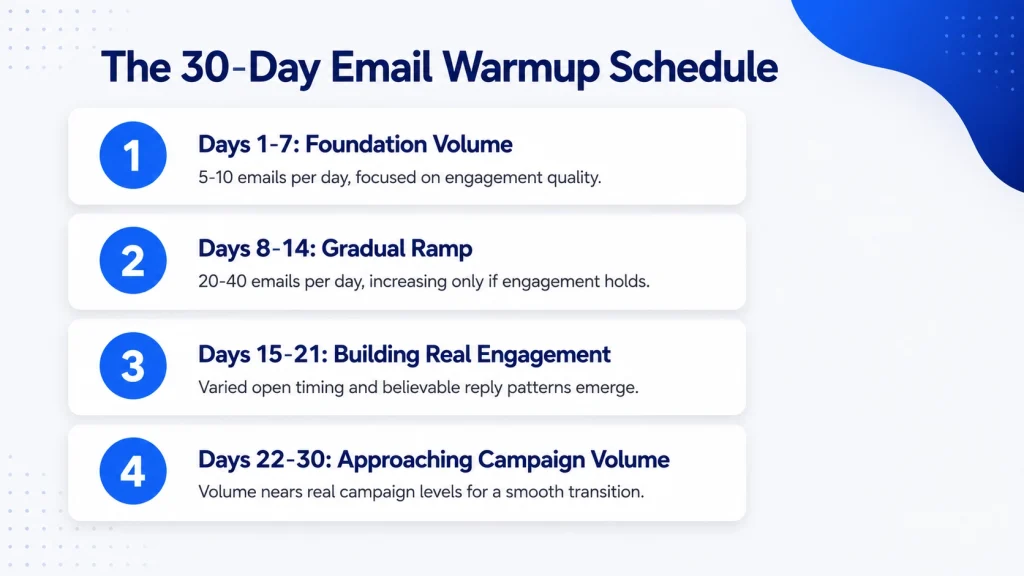
Days 1-7: Foundation Volume
Start small, roughly 5-10 emails per day, focused entirely on engagement quality over volume. This isn’t the phase to worry about hitting a number. It’s the phase where every warmup email should look and behave like something a real person sent.
Watch for consistent opens and a reasonable reply rate during this week, since a low-volume phase with poor engagement is a worse signal than a low-volume phase with strong engagement.
Days 8-14: Gradual Ramp
Increase gradually, doubling volume only if engagement stays healthy, not on a fixed timer regardless of results. If open rates or reply patterns dip during this stretch, hold volume steady rather than pushing forward on schedule.
By the end of this week, most domains should be sending between 20 and 40 emails per day, assuming week one’s engagement held up. This is still well below normal campaign volume, and that’s intentional.
Days 15-21: Building Real Engagement
This is where reply and open patterns should start looking genuinely varied, not templated. Open timing should spread across a realistic window rather than clustering right after send. Replies should show up at a believable, inconsistent rate, not a fixed percentage every single day.
If your warmup emails are all opened within seconds of arrival, every single day, that pattern itself is a signal worth addressing before moving forward, regardless of what week you’re in.
Days 22-30: Approaching Campaign Volume
Volume should be close to what the live campaign will actually send, so the transition isn’t a visible jump. If your real campaign will send 100 emails a day, warmup by day 30 should be somewhere close to that, not still sitting at 30 or 40.
A big volume jump right at campaign launch is one of the more common triggers for a sudden reputation dip, since it looks like exactly the kind of spike filtering systems are built to catch.
Daily Sending Volume Limits by Domain Age
Brand new domains need slower ramps than domains with some sending history already, even if that prior history is limited. A domain registered within the last 30 days should stay conservative through the entire schedule above, since providers weight domain age as one input among several.
A domain with six months or more of quiet, unremarkable sending history can generally move through the same email warmup schedule slightly faster, since it isn’t starting from zero trust.
Volume limits are a guardrail, not a target to hit as fast as possible. Reaching campaign volume two weeks early doesn’t earn extra credit if engagement quality dropped to get there. A slower, healthier ramp beats a faster, riskier one almost every time.
Reply-Rate and Engagement Targets to Watch
Watching engagement trends matters more than hitting one single benchmark number. A reply rate of 20% in week one and 22% in week three tells you more than either number alone, since the trend shows the pattern is holding or improving.
A flat, unchanging engagement pattern is often as much a warning sign as a declining one. If your open rate and reply rate look identical, day after day, down to the percentage point, that consistency itself can look synthetic to filtering systems built to detect exactly that kind of uniformity.
Real engagement has some noise in it. A day with slightly lower opens followed by a strong day is more believable than a perfectly smooth line across the entire 30 days.
When to Transition Into Live Campaigns
A few signals suggest a domain is genuinely ready, rather than just having reached day 30 on the calendar. Stable engagement for at least a week is the first one, meaning open and reply patterns aren’t still trending upward or fluctuating widely.
No blacklist flags during the warmup period matter too, since even a brief blacklist appearance can undo weeks of otherwise healthy sending history. Authentication passing cleanly across SPF, DKIM, and DMARC, with no intermittent failures, rounds out the checklist.
Transitioning too early is the single most common reason a carefully built email warmup schedule fails to translate into results. A domain that looks fine on day 25 but hasn’t held that stability for a full week is a domain that hasn’t actually finished building sending history yet, regardless of what the calendar says.
Signs Your Domain Isn’t Ready Yet
A few patterns suggest more time is needed before launching a real campaign. Engagement that plateaus too early, meaning open and reply rates stall out well below where they should be for the volume being sent, points to an underlying trust problem the schedule alone hasn’t fixed.
Unexplained blacklist hits during warmup, even brief ones, suggest something in your setup, whether shared IP reputation or a configuration issue, needs attention before adding real campaign volume on top.
Inconsistent authentication results, where SPF or DKIM occasionally fails despite being configured correctly, point to a DNS or infrastructure issue that needs resolving before the sending history being built can be trusted.
Email Warmup Schedule FAQ
How long should an email warmup schedule take before sending campaigns?
Most domains need the full 30 days outlined above, though domains recovering from a prior reputation issue often need longer. A domain with strong, stable engagement earlier than 30 days can sometimes transition sooner, but stability matters more than speed.
What happens if you skip days during warmup?
Occasional gaps aren’t necessarily disqualifying, since real senders don’t send perfectly every single day either. But frequent or unpredictable gaps disrupt the gradual sending history the schedule is designed to build, and may require restarting part of the ramp.
Can you speed up the schedule for an urgent launch?
Compressing the schedule increases risk, since the entire point is giving inbox providers time to observe consistent behavior. If a launch is genuinely urgent, it’s usually safer to launch at lower volume on a shorter warmup than to compress a full ramp into an unrealistic timeframe.
Does warmup inbox behavior need to match my real campaign content?
Yes. Warmup email tools that generate generic placeholder content build sending history for an email that looks nothing like your actual campaign. If your real campaign includes links and a signature, warmup traffic should reflect that structure well before day 30.
Do B2B and B2C domains need different warmup schedules?
The underlying schedule structure is similar, but expected engagement patterns differ. B2B sending typically sees lower volume with more deliberate reply patterns, while B2C often involves higher volume with different expected open behavior. An email warmup service that treats both the same way is missing a real variable.
Is a 30-day email warmup schedule the same for every email warmup tool?
No. Different warmup inbox tools structure their ramps differently, and some adjust pace based on real engagement rather than a fixed calendar. The 30-day framework here is a solid general baseline, but the right pace for your specific domain depends on its age, history, and how engagement responds along the way.
The Bottom Line
An email warmup schedule only works if it responds to what’s actually happening with your domain, not a fixed countdown that ignores engagement quality along the way. Volume matters less than whether the sending history you’re building looks genuinely earned.
E-Warmup builds and adjusts the ramp automatically based on real engagement signals, rather than a fixed calendar countdown, so the schedule adapts if a domain needs more time before moving forward.
Follow a real email warmup schedule instead of guessing, free forever, no card required.
Related Reading
- How to Increase Open Rate in Cold Email Without Triggering Spam Filters — practical fixes for open-rate problems that go beyond subject-line tweaks.
- AI Email Warmup: How AI Read Emulation Is Changing the Way Domains Build Trust — how AI-driven engagement variation differs from the basic automated warmup covered in this schedule.
