
Instantly alternatives come in two groups: outreach platforms with bundled warmup, like Smartlead and Woodpecker, and dedicated warmup tools like E-Warmup. Instantly’s own help center says its warmup health score reflects warmup placement only and does not measure campaign placement. A dedicated tool such as E-Warmup adds inbox placement tests, blacklist monitoring, and warmup on your own copy.
Key Takeaways
- Instantly, Smartlead, and Woodpecker all warm mailboxes through pool-based networks, so switching between them does not change the basic mechanism.
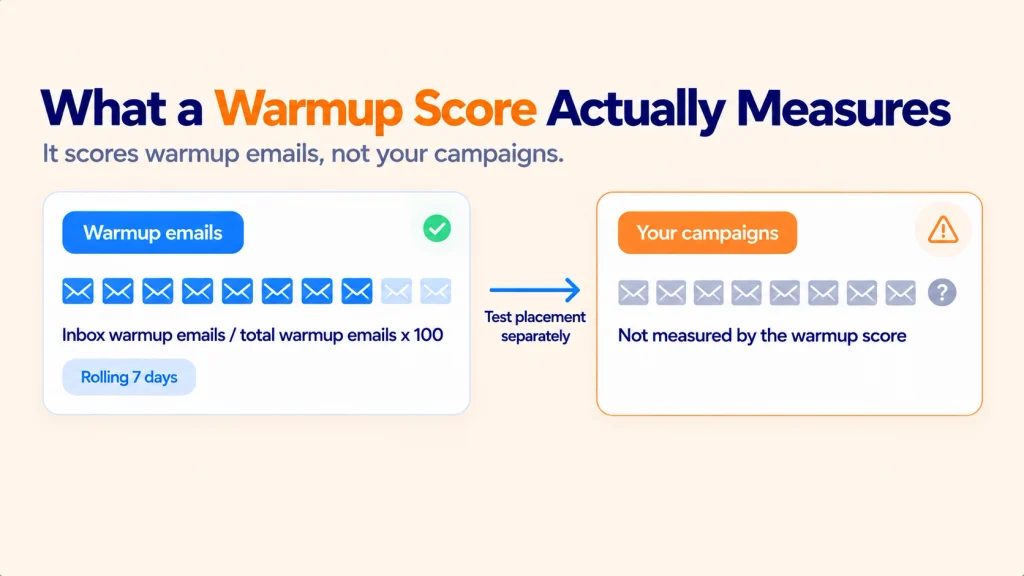
- Instantly’s health score is calculated from warmup emails only, over a rolling 7 days. It is not a campaign placement score.
- Woodpecker’s warmup is an add-on powered by Mailivery or Warmy, and it lets you add your own copy to warmup.
- Smartlead adds volume controls and removes bouncing accounts from its warmup pool, plus an on-demand blacklist check.
- A dedicated tool is worth adding when you need placement tests, ongoing blacklist monitoring, or warmup that uses your real copy.
If you are searching for Instantly alternatives, you are probably in one of two spots. Either you want a different sending platform, or you suspect the warmup feature inside your current one is not doing as much as its score suggests.
This guide covers both. We read each platform’s own documentation, compare the same four criteria across all three, and show where a bundled feature stops. E-Warmup comes last, described factually.
What Built-In Warmup Is Designed For
Built-in warmup exists to get a new mailbox sending at a safe pace. The platform connects your mailbox to a network, sends and replies to warmup messages automatically, and ramps volume up over time.
That job is real and useful. A brand new mailbox with no sending history is a risk, and a gentle ramp reduces it.
The limit is scope. The feature is one tab inside a product built to send campaigns, so the warmup is shaped by what is easy to bundle, not by what a deliverability specialist would build.
Notice what the feature is measuring. A warmup score tells you how warmup messages landed. It cannot tell you how your next campaign will land.
Instantly, Smartlead, and Woodpecker’s Warmup Features Compared
Here is the same set of criteria applied to each platform: network approach, copy source, audience targeting, and blacklist monitoring depth. Everything below comes from each vendor’s public documentation.
| Criteria | Instantly | Smartlead | Woodpecker |
| Network approach | Pool-based warmup network | Pool-based warmup pool | Add-on powered by Mailivery or Warmy |
| Warmup copy | Plain text warmup emails | Platform-generated warmup content | Your own copy can be added to warmup |
| Controls | Read Emulation setting, daily volume | Smart-Adjust, randomised volume, reply rate 20-30% | Slots by plan, one warmup per mailbox |
| Audience targeting | Not documented in the sources reviewed | Not documented in the sources reviewed | Not documented in the sources reviewed |
| What the report shows | Health score from warmup placement, rolling 7 days | Warmup stats per account | Warmup status per mailbox |
| Blacklist and DNS checks | Not part of the warmup feature | On-demand Blacklist Check Tool | Not part of the warmup feature |
| Cost model | Feature inside the platform | Feature inside the platform | Free slots by plan, then $5 per mailbox per month |
How Instantly Email Warmup Works
Instantly’s help center describes warmup as a network that sends and receives emails between connected accounts. It recommends a health score above 90%, at least 2 weeks of warmup, and around 10 warmup emails a day for new accounts.
The score itself is simple. It divides warmup emails that reached the inbox by total warmup emails, multiplied by 100, over a rolling 7 days.
Two details matter here. The score covers warmup placement only, and it resets to 0 after 7 days without warmup.
Instantly sends its warmup emails as plain text. It also offers a Read Emulation setting, so “AI read behavior” is no longer a feature only a dedicated tool offers. Check the current settings page for what it does today.
How Smartlead Warmup Works
Smartlead’s help center describes warmup as a feature that connects your accounts to a warmup pool and sends emails between them. Its Smart-Adjust algorithm changes the sending pattern, and volume is randomised so the activity looks less mechanical.
Smartlead documents a reply rate of 20-30% for warmup emails. It also says a bounce protection step removes an account from the warmup pool if the account bounces.
Smartlead also offers an on-demand Blacklist Check Tool. On-demand means you run it when you decide to, which is different from continuous monitoring.
How Woodpecker Warmup Works
Woodpecker’s warmup is an add-on. Its help center says the add-on is powered by Mailivery or Warmy, so the network belongs to those providers.
Woodpecker publishes pricing for the add-on: some free slots depending on your plan, then $5 per mailbox per month. That is clear and easy to budget.
Woodpecker also has an “Add copy to warm-up” option, so you can include your own messaging. Its help center recommends not running campaigns and warmup at the same time on the same mailbox.
Going deeper: Why do high warmup scores and spam folder placement happen together? We break down the mechanics in Why Your Outreach Tool’s Email Warmup Service Isn’t Actually Warming Anything Up.
Where a Bundled Feature Falls Short
None of the three is a bad product. The gaps come from the design of a bundled feature, and they are the same gaps whichever platform you pick.
The score measures the wrong thing for your goal. If you want campaigns to reach the inbox, a warmup placement score is an indirect signal. Instantly says so in its own documentation.
The network is shared. Pool-based warmup means your mailbox trades messages with other users’ mailboxes. Everyone in the pool is also a sender, so the traffic reflects the pool, not your real audience.
Your copy is often not part of it. Instantly sends plain text warmup emails, and Smartlead uses its own warmup content. Woodpecker is the exception here, with its own-copy option.
Blacklist and DNS checks are thin. Smartlead offers an on-demand check. The other two do not list blacklist monitoring as part of warmup.
Campaigns and warmup compete. Woodpecker recommends separating them. That is sensible, and it also means a mailbox in warmup cannot do its main job yet.
| Gap | What it means for you | What to look for |
| Warmup-only score | A high score does not predict campaign placement | Placement tests on real messages |
| Shared pool | Your traffic mixes with other senders’ traffic | A network of real inboxes |
| Generic copy | Warmup mail looks different from your campaigns | Warmup on your own copy |
| On-demand checks | Listings can appear between checks | Continuous blacklist monitoring |
None of these gaps are fatal. They are reasons to measure placement separately instead of trusting one dashboard number.
When a Dedicated Warmup Tool Makes Sense Instead
Switching platforms will not change the mechanism. If you move from Instantly to Smartlead or Woodpecker, you move between pool-based warmups. That is worth knowing before you spend a weekend migrating campaigns.
A dedicated warmup tool makes sense in a few clear situations.
| Your situation | Why a dedicated tool helps |
| You send from many mailboxes on one domain | You need one place to watch domain reputation |
| Your health score is high but replies are low | You need a placement test on real messages |
| You use Klaviyo or Mailchimp as well as an outreach tool | You need warmup that works beside any sending platform |
| You keep landing on blacklists | You need monitoring that does not depend on you remembering to check |
| Your offer depends on exact wording | You need warmup that uses your own copy |
A dedicated tool also connects at the mailbox level, so it can run next to whichever sending platform you use. You can keep Instantly, Smartlead, or Woodpecker for sending and treat warmup as a separate layer.
Google’s Postmaster Tools documentation is a useful neutral reference here. It explains how Gmail reads sender reputation, and no vendor score replaces that signal. See Google’s Postmaster Tools help.
Where E-Warmup Fits
E-Warmup is a dedicated warmup tool. It does not send campaigns. It connects to a mailbox through OAuth or SMTP and IMAP, so it works beside any sending platform.
Here is what it offers, using the same criteria as above.
| Criteria | E-Warmup |
| Network approach | 40,000+ real inboxes across 85,000+ domains |
| Warmup copy | Bring your own copy (Basic plan and up) |
| Controls | Topic selection (Basic and up), AI Read Emulation (Growth) |
| Blacklist and DNS checks | Continuous blacklist monitoring and delisting at the domain level (Basic and up), plus DNS tests |
| What the report shows | Inbox placement tests on top of warmup activity |
| Cost model | Free Forever plan, paid plans from $49 |
The Free Forever plan covers 1 mailbox with 10 warmup emails a day, 5 placement tests, and 5 DNS tests. Basic is $49 for 5 mailboxes and 150 emails a day. Growth is $99 for 20 mailboxes and 300 a day.
New paid subscriptions come with a 14-day money-back guarantee. Read more in how AI Read Emulation works.
Good fit: teams that send from several mailboxes and want a second opinion on placement. Not a fit: anyone who only needs a basic ramp for one low-volume mailbox, where a built-in feature may be enough.
| Tool | Best for | Watch out for |
| Instantly | Teams already sending from Instantly | Score reflects warmup placement only |
| Smartlead | Teams that want volume controls and bounce protection | Blacklist check is on demand |
| Woodpecker | Teams that want own-copy warmup and clear add-on pricing | Warmup and campaigns should not run together |
| E-Warmup | Teams that want placement tests and continuous monitoring | Does not send campaigns |
Frequently Asked Questions
What are the best Instantly alternatives for warmup?
For a full sending platform, Smartlead and Woodpecker are the two most often compared. For warmup specifically, a dedicated tool such as E-Warmup sits alongside any platform instead of replacing it.
Does Instantly’s health score show where my campaigns land?
No. Instantly’s help center says the score reflects warmup placement, calculated from warmup emails over a rolling 7 days. It is not a campaign placement measure.
Is Instantly email warmup enough on its own?
For a new mailbox on a low-volume schedule, often yes. For multiple mailboxes, high volume, or a history of spam placement, add placement tests and blacklist monitoring.
Do email warmup tools work with Smartlead or Woodpecker?
Yes, if the tool connects at the mailbox level. E-Warmup connects through OAuth or SMTP and IMAP, so it does not depend on which platform sends your campaigns.
Is there a free email warmup service?
Yes. E-Warmup’s Free Forever plan includes 1 mailbox, 10 warmup emails a day, 5 placement tests, and 5 DNS tests, with no card required.
Conclusion
The honest answer to “what are the best Instantly alternatives” is that built-in warmup works the same way on most platforms. Instantly, Smartlead, and Woodpecker all use pool-based networks, so a platform switch alone will not change your results.
What changes results is measuring placement separately and warming on copy that resembles your real emails. That is the dedicated layer outreach platforms do not fully replace.

Compare real warmup against the built-in feature, free forever, no card required.
